Metrics of classification

While solving classification problem, there are certain metrics that are to be studied before making any decision. Some of the metrics include confusion, matrix, ROC curve, etc. Let’s study these matrices by practical use case. For this demonstration, I choose the breast cancer dataset provided by sklearn.

import pandas as pd, numpy as np,  matplotlib.pyplot as plt, seaborn as sns
from sklearn.datasets import load_breast_cancer
from sklearn.model_selection import train_test_split
from sklearn.linear_model import LogisticRegression
from sklearn import metrics
df = pd.DataFrame(load_breast_cancer()['data'], columns=load_breast_cancer()['feature_names'])
df['label'] = load_breast_cancer()['target']
df
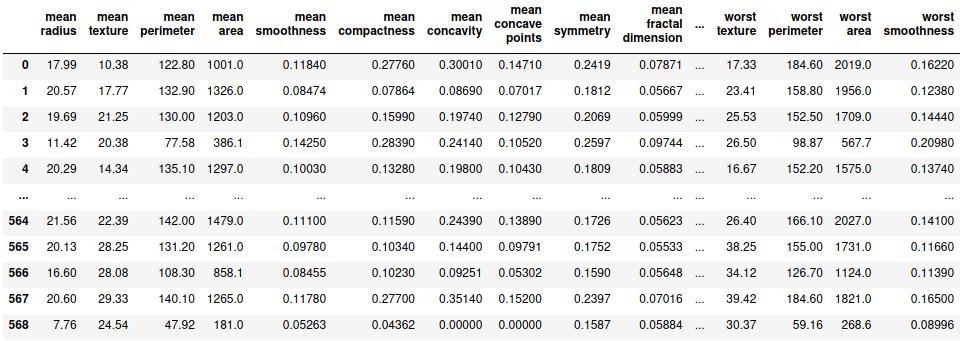
Let’s first split the data set in to X and y where X is the set of independent variables and y is the dependent variable. X and y are further splitted into training and testing data sets.

X = df.drop('label', axis=1)
y = df.label
X_train,X_test, y_train,y_test = train_test_split(X,y, train_size=0.7, random_state=100)

Since we have got the required datasets, let’s fit a simple logistic regression model on the training dataset and find the probabilities of being predicted as positive when the training dataset itself is evaluated.

lg = LogisticRegression(max_iter=1000)
lg.fit(X_train, y_train)

pred_prob = [i[1] for i in lg.predict_proba(X_train)]
pred_prob
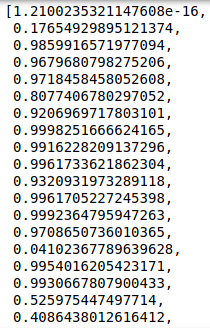
Now since we have got the probability values, let’s try to obtain the value of threshold above which we classify the prediction to be positive otherwise negative. This decision is taken based on various metrices and the corresponding visualizations that we will be discussing further.

1. Confusion Matrix

  • True Negatives (TN) – These are the values which are actually negative and have rightly been classified as negatives.
  • False Positives (FP) – These are the values which are actually negative but have wrongly been classified as positives.
  • True Positives (TP) – These are the values which are actually positive and have rightly been classified as positives.
  • False Negatives (FN) – These are the values which are actually positive but have wrongly been classified as negatives.

In order to understand the concept of confusion matrix, let’s consider the threshold to be 0.5.

sort = lambda x: 1 if x>=0.5 else 0
train_pred = [sort(i) for i in pred_prob]
conf = metrics.confusion_matrix(y_train, train_pred)
sns.heatmap(conf, cmap='YlGnBu', annot=True, fmt='.1f')
plt.xlabel('Predicted label')
plt.ylabel('Actual Label')
plt.show()
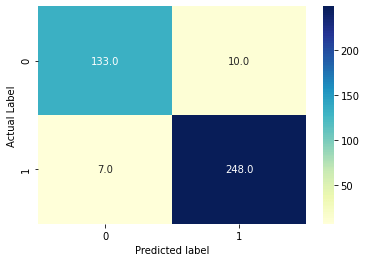
  • TN = 133
  • FP = 10
  • TP = 248
  • FN = 7

2. Accuracy, Sensitivity, Specificity, Precision, False Positive Rate

  • Accuracy = (TP + TN) / (TN + FP + TP + FN)
  • Sensitivity = TP / (TP + FN)
  • Specificity = TN / (TN + FP)
  • Precision = TP / (TP + FP)
  • False Positive Rate (FPR) = FP / (TN + FP) = 1 – Specificity

Accuracy stands for the number of correctly classified data points among all the data points. Sensitivity stands for the number of rightly classified data points among the actual positive data points. It is also called Recall or True Positive Rate (TPR). Specificity stands for the number of rightly classified data points among all the actual negative data points. Precision stands for the the number of correctly classified data points among all the positive classifications. It is also called Positive Value Predicted (PVP). False Positive Rate (FPR) stands for the number of wrongly classified data points among the all the negative data points.

3. ROC (Receiver Operating Characteristic) curve and AUC (Area Under Curve) score

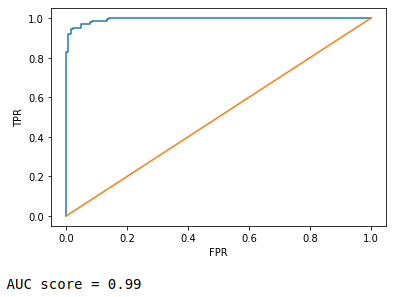
It is nothing but FPR vs. TPR graph, FPR in x-axis while TPR in y-axis at a range of different threshold values. You can read more about it here. AUC score is simple the area subtended by the ROC curve over x-axis. More the are, better the curve.

FPR,TPR,thresh = metrics.roc_curve(y_train, pred_prob)
plt.plot(FPR,TPR)
plt.plot([0,1],[0,1])
plt.xlabel('FPR')
plt.ylabel('TPR')
plt.show()
print('AUC score =', round(metrics.roc_auc_score(y_train, pred_prob),2))
4. Sensitivity vs. Specificity vs. Accuracy curve

In this metric, we identify the threshold by plotting the different values of sensitivities, specificities and accuracies at different values of threshold.

metr = pd.DataFrame({'Actual':y_train,'pred_prob':pred_prob})
curve = pd.DataFrame(columns=['Sensitivity','Specificity','Accuracy'])

for i in np.linspace(0.1,0.9,10):
    metr['predicted'] = metr.pred_prob.map(lambda x: 1 if x>i else 0)
    conf = metrics.confusion_matrix(metr.Actual, metr.predicted)
    sensitivity = metrics.recall_score(metr.Actual, metr.predicted)
    specificity = conf[0,0]/sum(conf[0])
    accuracy = metrics.accuracy_score(metr.Actual, metr.predicted)
    curve.loc[i] = [sensitivity, specificity, accuracy]
    
curve.index.rename('Threshold', inplace=True) 
curve

Now we plot these with respect to threshold values and find the optimum value of threshold where value of these 3 metrices are highest.

plt.plot(curve.index,curve.Sensitivity, label='Sensitivity')
plt.plot(curve.index,curve.Specificity, label='Specificity')
plt.plot(curve.index,curve.Accuracy, label='Accuracy')
plt.grid(alpha=0.6)
plt.legend()
plt.show()
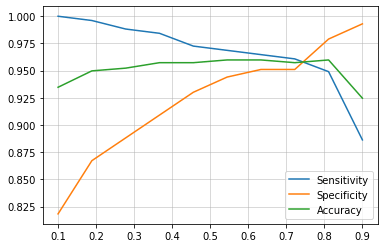
It is clearly visible that at around 0.75, sensitivity, specificity and accuracy have the highest values.

5. Precision-Recall curve

Similarly as before, here we plot different values of precision and recall at different values of threshold.

precision,recall,threshold = metrics.precision_recall_curve(y_train, pred_prob)
plt.plot(threshold, precision[:-1], label='Precision')
plt.plot(threshold, recall[:-1], label='Recall')
plt.grid(alpha=0.6)
plt.legend()
plt.show()

Here we can see that the highest value of precision and recall is at 0.6.

Now, there is a trade-off. We can either choose 0.75 or 0.6 depending on our priorities. Based on the domain knowledge, we can say that we can afford to misclassify a negative patient to be positive but can not afford a positive patient to misclassify as negative since it may cause a life threat. Thus we can say that we prioritize more sensitivity than specificity. Thus we can choose 0.6 which definitely would give more value of sensitivity than at 0.75

test_pred_proba = [i[1] for i in lg.predict_proba(X_test)]

sort = lambda x: 1 if x>=0.6 else 0
test_pred = [sort(i) for i in X_test_pred]

conf = metrics.confusion_matrix(y_test, test_pred)

print('Accuracy =',round(metrics.accuracy_score(y_test, test_pred),2))
print('Sensitivity/Recall =',round(metrics.recall_score(y_test, test_pred),2))
Accuracy = 0.96
Sensitivity/Recall = 0.96

Here we have obtained an accuracy and sensitivity of 96%. We have practically seen and understood the matrices involved in the decision making of a practical use case. I hope you found this interesting.

—END—

Boosting

Boosting is the most common type of classes of algorithm performed globally to solve various kind of problems. It comprises of several weak learners or machine learning models which work together to compromise for the unlearnt pattern or miss-classified data points by the preceding model, through prioritizing those data points. One of the most commonly, rather simple boosting algorithm is ‘Adaboost’ which we will be discussing in detail in this blog. We will also be building the algorithm from scratch and see it performing to increase accuracy.

Before proceeding for Adaboost, let’s see an overview of boosting principle through the following image (Image source)

Among the above boxes, the boxes 1, 2 and 3 are classified by the models D1, D2, and D3 models which are individually not so effective for classification but when the are incorporated together as shown in box 4, they together perform the classification very accurately.

Similar thing happens in case of adaboost as well where weights are assigned with each prediction and weights are subsequently updated to a higher or lower value depending on the correctness of classification. We will further see each step of the algorithm along side practical implementation.

For our understanding let’s choose the ‘breast cancer’ dataset provided by sklearn library. Let’s first load and visualize the data.

df = pd.DataFrame(load_breast_cancer().data, columns=load_breast_cancer().feature_names)
df['label'] = load_breast_cancer().target

copy = df.copy()

df.head()

Since there are large number of columns in the data set, we will be basically focusing on the ‘label’ column and the upcoming other columns that will get appended adjacent to ‘label’ column.

Let’s use a Decision tree to make an initial prediction and just see the obtained accuracy.

dt = DecisionTreeClassifier(random_state=50, min_samples_split=100)
dt.fit(df.iloc[:,:-1],df.iloc[:,-1])
df['prediction'] = dt.predict(df.iloc[:,:-1])
df.iloc[:5,-2:]
print('Accuracy =',accuracy_score(df.label, df.prediction))
Accuracy = 0.945518453427065
We are getting an accuracy of around 95%.

Let’s see after applying adaboost, do we get more accuracy or not?

Step 1

Assign weight of 1/m for each data point, where m is the number of data points.

df['weight'] = 1/len(df)
df.iloc[:5,-3:]

Step 2

Finding number of wrongly classified data points.

no_of_errors = len(df[df.label != df.prediction1])
no_of_errors

There are 31 wrongly classified data points.

Calculating total error, where total error = no_of_errors/total number of data points

total_errors = no_of_errors/len(df)
total_errors

We get total error of 0.054481546572934976

Step 3

Calculating amount of say (α)

alpha = 0.5 * np.log((1-total_errors)/total_errors)
alpha

We get 1.426935677838319 as the amount of say.

Step 4

Weight updation using the following rule:

For correct prediction,

updated weight = old weight X eα

For incorrect prediction,

updated weight = old weight X eα

df['weight_updated'] = df.loc[df.label != df.prediction].weight * np.exp(alpha)
df.weight_updated = df['weight_updated'].fillna(df[df.label == df.prediction].weight * np.exp(-alpha))
df.iloc[:5,-4:]

The updated weights are now normalized, so that sum of all the values in the column is equal to 1.

df.weight_updated = df.weight_updated/df.weight_updated.sum()
df.iloc[:5,-4:]

Now, we can see that in updated weights column, the values for the incorrect predictions are significantly higher that the ones with correct predictions.

Step 5

Now ranges are created for each updated weight, which are nothing but the column wise cumulative addition for values. For eg., the range for index 0 is ‘0 to 0.016129’, for index 1 is ‘0.016123 to (0.016129+0.000929)’, for index 2 is ‘(0.016129+0.000929) to ((0.016129+0.000929) + 0.000929)’ and so on.

This way the value of range for the last index will reach 1 since after normalization, their sum has been equal to 1.

Step 6

Resampling of data is done. The process of resampling is that a random number between 0 and 1 is chosen. The range within which that number is falling, that specific index from ‘df’ dataframe is included in the new resampled dataframe. Since the wights of incorrect predictions were high, subsequently the ranges would be high as well. Therefore a lot of the randomly choosen numbers will fall in the incorrectly predicted data points’ ranges. And hence those data points will get repeated quite a large number of timed in the new resampled dataframe and will get more priority.

resampled = pd.DataFrame(columns=df.columns[:31])
for i in range(len(df)):
    index = df[df.ranges == df[np.random.rand()<df.ranges].ranges.min()].index
    resampled.loc[i] = list(df.iloc[index,:31].values[0])
    
resampled.head()

These resampled data is again used the same way being processed in step 1.

These 6 steps are repeated number of times till total error gets equal to 0 and the amount of say turns to infinite. For this purpose let’s build a function accumulating all the above codes to perform iterations.

def adaboost(df):
    dt = DecisionTreeClassifier(random_state=50, min_samples_split=100)
    dt.fit(df.iloc[:,:30],df.iloc[:,30])
    df['prediction'] = dt.predict(df.iloc[:,:30])
    
    df['weight'] = 1/len(df)
    
    no_of_errors = len(df[df.label != df.prediction])
    
    total_errors = no_of_errors/len(df)
    
    alpha = 0.5 * np.log((1-total_errors)/total_errors)
    
    df['weight_updated'] = df.loc[df.label != df.prediction].weight * np.exp(alpha)
    df.weight_updated = df['weight_updated'].fillna(df[df.label == df.prediction].weight * np.exp(-alpha))
    
    df.weight_updated = df.weight_updated/df.weight_updated.sum()
    
    p = 0
    for i in range(len(df)):
        df.loc[i,'ranges'] = df.loc[i,'weight_updated'] + p
        p = df.loc[i,'ranges']
        
    resampled = pd.DataFrame(columns=df.columns[:31])
    for i in range(len(df)):
        index = df[df.ranges == df[np.random.rand()<df.ranges].ranges.min()].index
        resampled.loc[i] = list(df.iloc[index,:31].values[0])  
    
    df = resampled
    
    return [df, dt]

The above function returns the resampled dataframe and the trained model for each iteration. This function is executed and the final resampled dataframe and the trained models from each iterations are stored.

df = copy.copy()

models = []    
    
try:
    for iter in range(20):        
        ada = adaboost(df)
        df = ada[0]    
        models.append(ada[1])
        print('Decision stamp {0}'.format(iter+1))
    
except Exception:
    pass

We obtained 10 decision stamps or models which will together make future predictions. Now these models will be used on the same dataset for which we initially got an accuracy of 95%. Let’s use these models on the same dataset and aggregate their outputs.

pred = np.zeros(len(df))
for i in range(len(models)):    
    pred += models[i].predict(copy.iloc[:,:-1])

pred

These are the aggregate of the predicted outputs of the models. For each mode, the output is either 1 or 0. Therefore in the above output array, number 2 means 2 models have classified it as 1, number 6 means 6 out of 10 models have classified it as 1.

Based on the number of models, the threshold is set to half the total number of models, i.e., if the number if any output is more than half the number of models used, it will be classified as 1 otherwise 0. Here in our case, output values with more than 5 are considered 1 and else are 0.

threshold = len(models)/2
vec = np.vectorize(lambda x: 1 if x>threshold else 0)
final_prediction = vec(pred)
final_prediction

Now based on the above output, the accuracy is calculated.

copy['final_prediction'] = final_prediction

print('Accuracy =',accuracy_score(copy.label, copy.final_prediction))
Accuracy = 0.9753954305799648
This time we obtained an accuracy of 98%.

Thus, we can see that we have successfully improved the accuracy using boosting.

Point to be noted that this entire process is for demonstration and understanding purpose only. I never encourage to use this process for solving real world problems. Instead you can use the automated sklearn Adaboost Classifier library for practical usage.

I hope I could explain the algorithm sufficiently enough for you to work with. Your valuable feedback is very much appreciated.

—END—

Sigmoid function and its applications

Starting with very basics, let’s understand what is sigmoid?

Sigmoid is just a mathematical function given by the following expression:

When plotted, it forms a ‘S’ like curve ranging between 0 and 1:

Image source

In the realm of machine learning, we can use this function for our advantage. It can be used for classification problems where one class is represented by 0 and the other by 1.

One such algorithm is called Logistic Regression. Let’s discuss the algorithm and see explicitly how sigmoid plays an important role. For this let’s just create an arbitrary dataset with one independent and one dependent variable.

import numpy as np, pandas as pd
import matplotlib.pyplot as plt, seaborn as sns

arr = np.arange(-10,21)
df = pd.DataFrame({'x':arr})
df['y'] = list(np.zeros(11)) + list(np.ones(len(arr)-11))
print(df.head(),'\n\n', df.tail())

Now, let’s plot this to get a visual perspective.

plt.figure(figsize=(20,8))
sns.scatterplot(x=df.x, y=df.y, hue=df.y, s=200)
plt.grid(alpha=0.8)
plt.show()

We can not definitely fit a straight line through the data points since there is no linear relationship. Let’s still assume a weight and intercept to fit an arbitrary line.

eqn = 0.4*arr -1

plt.figure(figsize=(20,8))
sns.scatterplot(x=df.x, y=df.y, hue=df.y, s=200)
plt.plot(df.x, eqn)
plt.grid(alpha=0.8)
plt.show()

We can see that this line is practically of no use. So, let’s just transform the line equation using the sigmoid function, i.e., in the above expression of sigmoid, we are replacing x with the line equation (eqn from code).

sig = 1/(1+np.exp(-eqn))
sig

Now let’s plot these transformed values with respect to the independent variables.

plt.figure(figsize=(20,8))
plt.plot(arr,sig, color='red',marker='o', markerfacecolor='green', markersize=13)
sns.scatterplot(x=df.x, y=df.y, hue=df.y, s=200)

for i in df.x:
    plt.axvline(i, alpha=0.2)
    
for i in sig:
    plt.axhline(i, alpha=0.2)

plt.show()

From the above graph, we can see that the straight line got transformed into a ‘S’ like sigmoid curve that ranges between 0 and 1. We can also see that each data point can now be projected over the sigmoid curve and subsequently we can set a threshold above which the class is 1. Let’s assume the threshold to be 0.23

threshold = 0.23

plt.figure(figsize=(20,8))
plt.plot(arr,sig, color='red',marker='o', markerfacecolor='green', markersize=13)
sns.scatterplot(x=df.x, y=df.y, hue=df.y, s=200)

for i in df.x:
    plt.axvline(i, alpha=0.2)
    
for i in sig:
    plt.axhline(i, alpha=0.2)

plt.axhline(threshold, color='magenta')
plt.show()

In the future upcoming data, after sigmoid transformation, of the value stands out to be more than the threshold (0.23), we can claim it to be belonging to class 1. By the way, logistic regression in sklearn library by default takes 0.5 as the threshold above which all data points are classified to be in class 1.

The best sigmoid curve is fit by choosing the ideal value of weights and intercepts. The process of attaining the optimal value is somewhat similar to linear regression where gradient descent is performed by calculating the gradients with respect to the corresponding loss function. Similarly the loss function for Logistic Regression is called Log Loss which is given by the following expression:

—END—

PCA

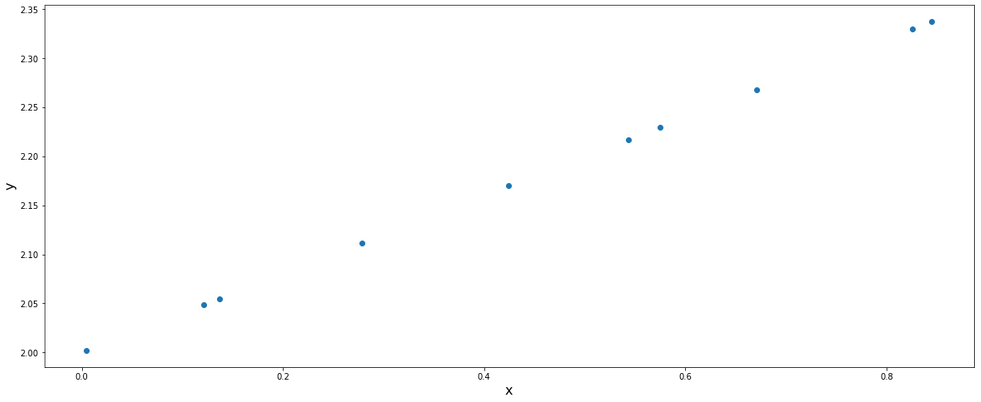
PCA stands for Principal Component Analysis. To explain in simple words, it is a process of dimensional reduction of data without loosing any significant information. We will be looking towards the entire algorithm and understand step by step. Let’s first build an arbitrary data set and plot it to have a visual representation of the data we will be dealing with.

import pandas as pd, numpy as np, matplotlib.pyplot as plt, seaborn as sns

np.random.seed(100)
x = np.random.sample(10)
y = 0.4*x + 2
df = pd.DataFrame({'x':x,'y':y})

df
plt.figure(figsize=(20,8))
plt.scatter(df.x,df.y)
plt.xlabel('x', fontsize=16)
plt.ylabel('y', fontsize=16)
plt.show()

From this data set, we can say that in order to represent these set of data, we need 2 dimensions. But what if we could use only 1 dimension instead of 2? This is what PCA helps us with. The dimensionality reduction helps us in various ways:

  • In case of many dimensions, we can reduce the dimensions so that we can visually represent the data.
  • Processing less dimension data aids in computational efficiency.

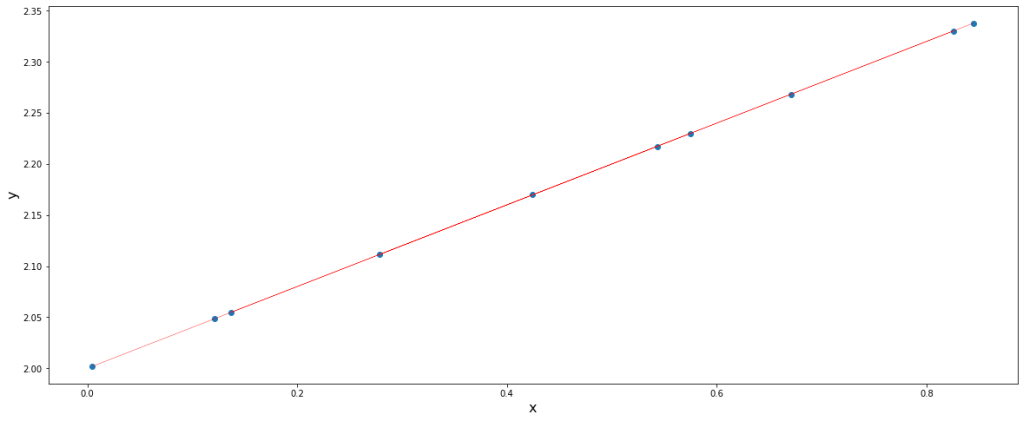
Simple explanation is that he PCA performs this task by rotating the Cartesian coordinates such that one coordinate lies on the data points (with maximum variance or information).

We can imagine the red line to be the x-axis which got transformed in such a way that now it lies over the data points. If that could be the case and we could find such transformations, dimensionality reduction would surely be possible.

In order to understand the algorithm, we must be familiar with certain terms:

  • Covariance matrix – It is a symmetric, positive and a square matrix with the covariance between each pair of elements of a given random vector. Covariance is a big topic in itself. You may click here for reading more about covariance.
  • Eigenvectors – The vectors formed after transforming another vector which does not change direction rather gets scaled at most are called eigenvectors.
  • Eigenvalues – The scaler value by which a vector gets scaled after transformation, corresponding to the eigenvector is applied is called eigenvalue.
  • Basis – The current basis is [[0,1],[1,0]]. These are the coordinates of the current x and y axis which are also called basis. Our aim is to find a new basis which satisfies our need of transformation.

Let’s find the covariance matrix for the dataframe first.

cov = np.cov(np.array(df).T)
cov

Now, let’s find the eigenvectors corresponding to the above covariance.

eig = np.linalg.eig(cov)
eig_vectors = eig[1]
eig_vectors

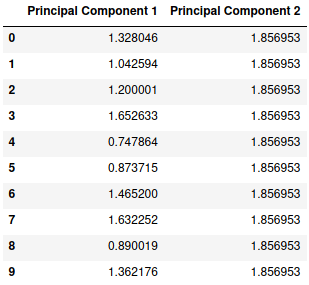
Now, this is our new basis. Let’s perform a dot product to the data points with this new basis.

new = df @ eig_vectors
new.columns = ['Principal Component 1','Principal Component 2']
new

We can clearly see that principal component 1 itself has all the information and variance stored whereas the principal component 2 has a constant value of 1.856953 which provides us with no useful information. Let’s plot this new set of data.

plt.figure(figsize=(20,8))
plt.scatter(new['Principal Component 1'],new['Principal Component 2'])
plt.axhline(y=new['Principal Component 2'][0], linewidth=0.5, color='red')
plt.xlabel('x', fontsize=16)
plt.ylabel('y', fontsize=16)
plt.show()

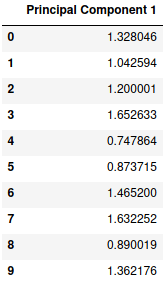
Thus, we have successfully obtained our desired transformation. We can see that the data points are defined by a single dimension itself and therefore we can ignore the second principal component and our final data set will look like this:

new = new.drop('Principal Component 2', axis=1)
new

Analogically, we can imagine the working of PCA in higher dimensions as well.

—END—

Concept of Clusters

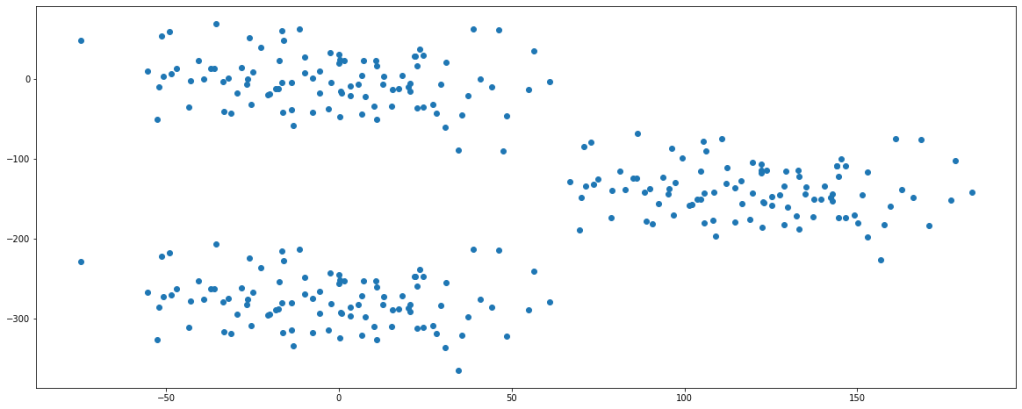
In simple words, clusters are groups of data points in the space within which the data points have similar characteristics. Whereas, data points from different clusters have significantly different characteristics. Let’s straight away visualize such a scenario.

def making_df(n=100, p1=100, p2=30, p3=2):
    np.random.seed(n)

    p=np.random.randn(p1)*p2
    q=np.random.randn(p1)*p2
    
    w=p
    x=q-2*p3*q.max()
    
        
    r=p+p3*p.max()
    s=q-p3*q.max()
       

    df0 = pd.DataFrame({'feature1':w,
                       'feature2':x, 'label':[0]*len(r)})
    df1 = pd.DataFrame({'feature1':p,
                       'feature2':q, 'label':np.ones(len(p))})

    df2 = pd.DataFrame({'feature1':r,
                       'feature2':s, 'label':[-1]*len(r)})

    df = pd.concat([df0,df1,df2], axis=0)
    df = df.sample(n=len(df))
    df = df.reset_index(drop=True)
    return [df,p,q,r,s,w,x]

This function helps in creating an arbitrary dataframe of our choice. Let’s build one for understanding purpose.

df,p,q,r,s,w,x = making_df()

plt.figure(figsize=(20,8))
plt.scatter(df.feature1,df.feature2)
plt.show()

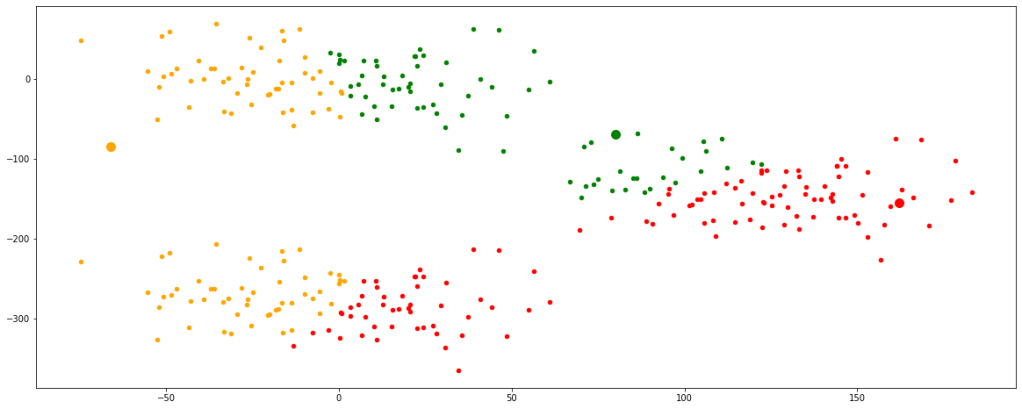
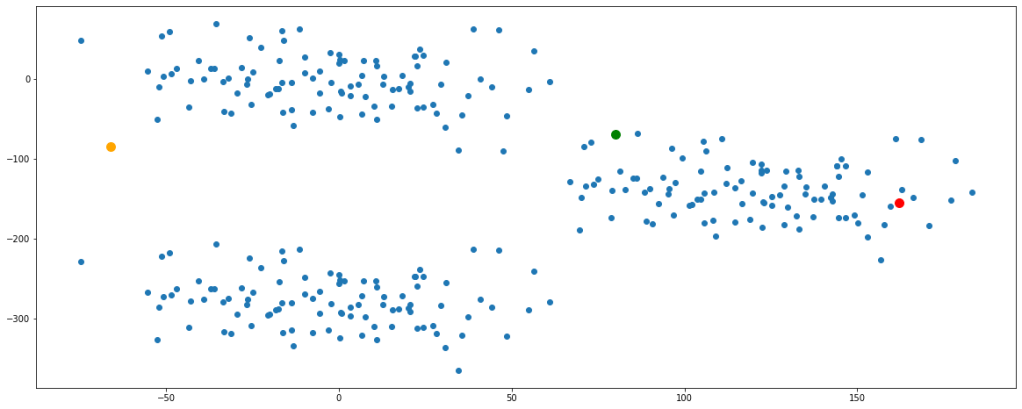
Looking at the plot, we can say that there are fairly 3 clusters present in the data set.

Clustering is a kind of unsupervised learning algorithm, i.e., we are not provided with labels rather we do segmentation based on their features. For our sake of understanding, let’s consider K-Means clustering for the topic and see how the algorithm works.

Step 1:

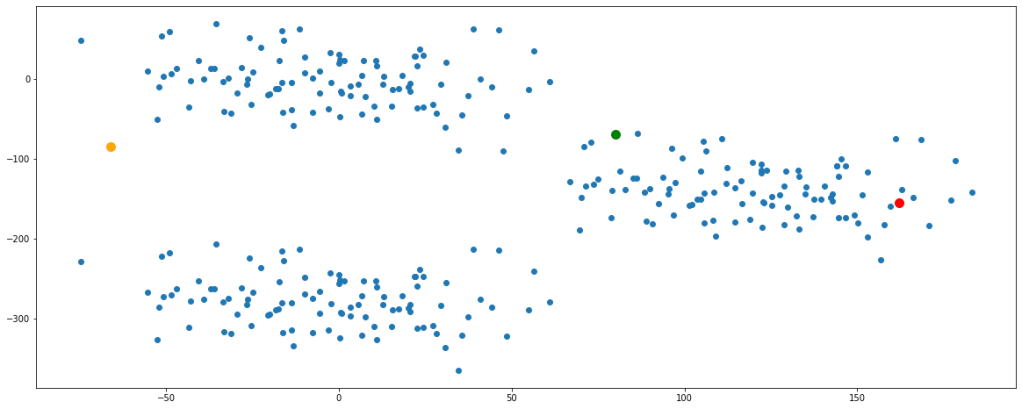
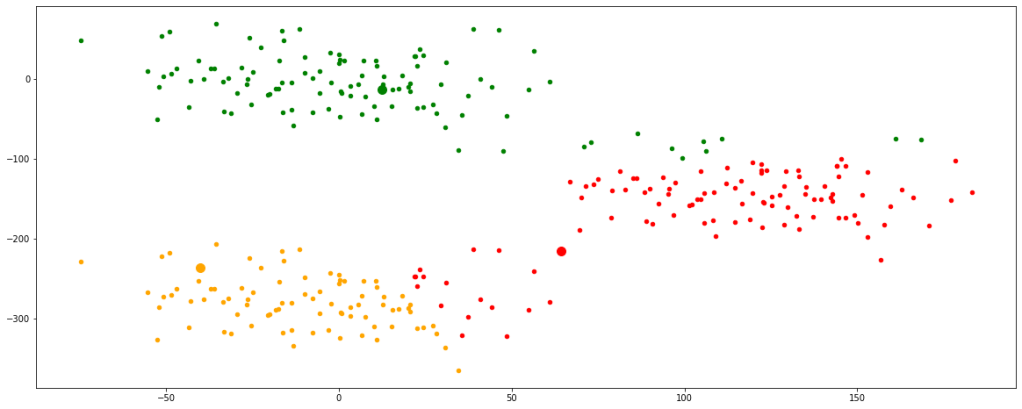
Initiate cluster centers, also calledcentroids at random in the space. Let us take 3 cluster centers and randomly fit them in the space.

seeds = [55,100,8000]

np.random.seed(seeds[0])
a = np.random.randint(df.feature1.min(),df.feature1.max())
b = np.random.randint(df.feature2.min(),df.feature2.max())

np.random.seed(seeds[1])
c = np.random.randint(df.feature1.min(),df.feature1.max())
d = np.random.randint(df.feature2.min(),df.feature2.max())

np.random.seed(seeds[2])
e = np.random.randint(df.feature1.min(),df.feature1.max())
f = np.random.randint(df.feature2.min(),df.feature2.max())

plt.figure(figsize=(20,8))
plt.scatter(df.feature1,df.feature2)
plt.scatter(a,b, color='green', s=100)
plt.scatter(c,d, color='orange', s=100)
plt.scatter(e,f, color='red', s=100)
plt.show()

Before proceeding ahead, let’s get clarified about Euclidean distance since this term will be used extensively. Wherever I say distance, I would actually mean ‘Euclidean Distance’. Euclidean distance is nothing but the formulation of the length of the hypotenuse in a right-angled triangle. You can read more about this by clicking here.

After the initialization of centroids, we calculate the distance of each point from each of the centroids.

def euc(x1,x2,y1,y2):
    dist = ((x1-x2)**2 + (y1-y2)**2)**0.5
    return dist

for i in range(5):
    cluster1 = euc(a,df.feature1,b,df.feature2)
    cluster2 = euc(c,df.feature1,d,df.feature2)
    cluster3 = euc(e,df.feature1,f,df.feature2)

    cluster = pd.concat([cluster1,cluster2,cluster3], axis=1)
    cluster.columns=['cluster1','cluster2','cluster3']


cluster

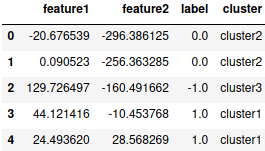
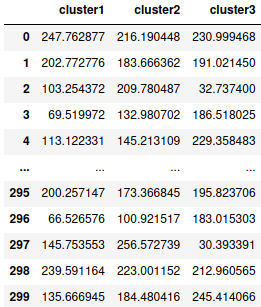
This dataframe gives us the distance of each data point represented by their index numbers with each centroid of their respective clusters. The thumb rule is that a data point will be considered to the cluster with the centroid of which it has the shortest distance.

Depending on these distances let’s classify the data points in either of the 3 clusters.

dic = {}
for i in cluster.index:
    dic[i]=cluster.columns[np.argmin(cluster.iloc[i])]

df['cluster'] = dic.values()

df.head()

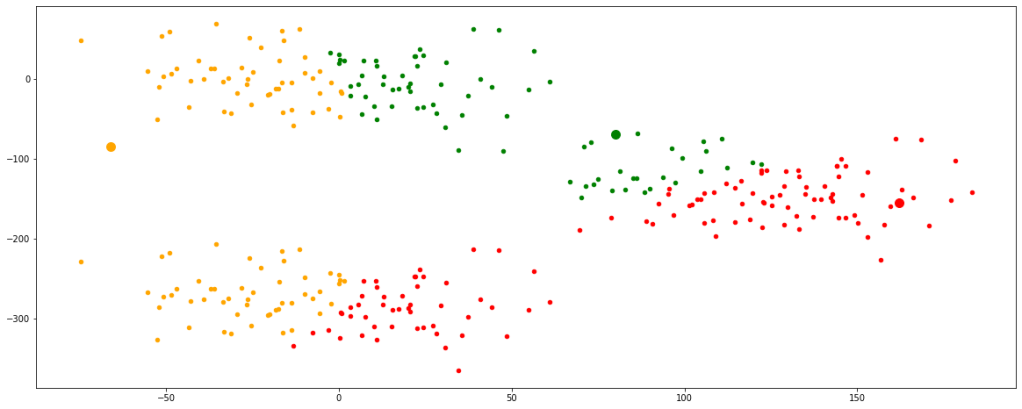
Let’s visualize the clusters formed with these newly initialized centroids.

plt.figure(figsize=(20,8))
plt.scatter(a,b, color='green', s=100)
plt.scatter(c,d, color='orange', s=100)
plt.scatter(e,f, color='red', s=100)

new = df[df.cluster=='cluster1']
plt.scatter(new.feature1,new.feature2, color='green', s=20)

new = df[df.cluster=='cluster2']
plt.scatter(new.feature1,new.feature2, color='orange', s=20)

new = df[df.cluster=='cluster3']
plt.scatter(new.feature1,new.feature2, color='red', s=20)

plt.show()

Step 2:

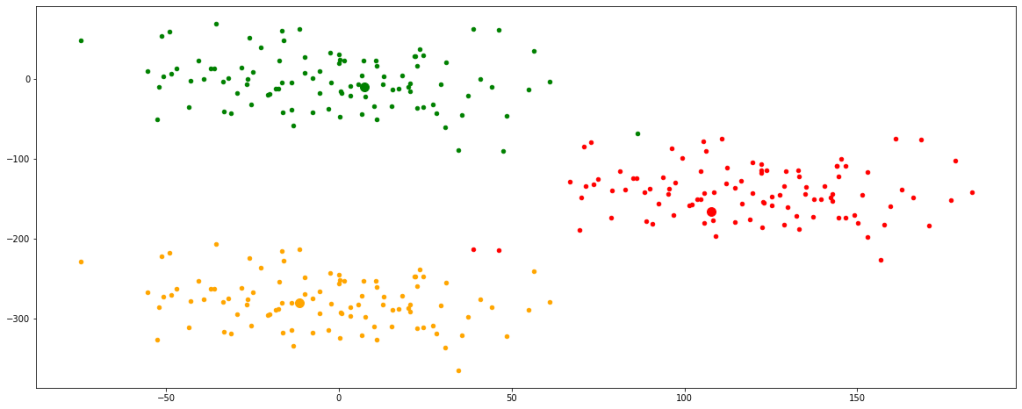
As we can see the clusters formed are not optimum, therefor we must update the centroids. It is done by taking the mean of the coordinates of data points in their respective clusters.

new = df[df.cluster=='cluster1']
a=new.feature1.mean()
b=new.feature2.mean()

new = df[df.cluster=='cluster2']
c=new.feature1.mean()
d=new.feature2.mean()

new = df[df.cluster=='cluster3']
e=new.feature1.mean()
f=new.feature2.mean()

Step 3:

The updated centroids are assigned again in the data space, distances from each data point are calculated and corresponding clusters are formed.

def euc(x1,x2,y1,y2):
    dist = ((x1-x2)**2 + (y1-y2)**2)**0.5
    return dist

for i in range(5):
    cluster1 = euc(a,df.feature1,b,df.feature2)
    cluster2 = euc(c,df.feature1,d,df.feature2)
    cluster3 = euc(e,df.feature1,f,df.feature2)

    cluster = pd.concat([cluster1,cluster2,cluster3], axis=1)
    cluster.columns=['cluster1','cluster2','cluster3']


dic = {}
for i in cluster.index:
    dic[i]=cluster.columns[np.argmin(cluster.iloc[i])]

df['cluster'] = dic.values()


plt.figure(figsize=(20,8))
plt.scatter(a,b, color='green', s=100)
plt.scatter(c,d, color='orange', s=100)
plt.scatter(e,f, color='red', s=100)

new = df[df.cluster=='cluster1']
plt.scatter(new.feature1,new.feature2, color='green', s=20)

new = df[df.cluster=='cluster2']
plt.scatter(new.feature1,new.feature2, color='orange', s=20)

new = df[df.cluster=='cluster3']
plt.scatter(new.feature1,new.feature2, color='red', s=20)

plt.show()

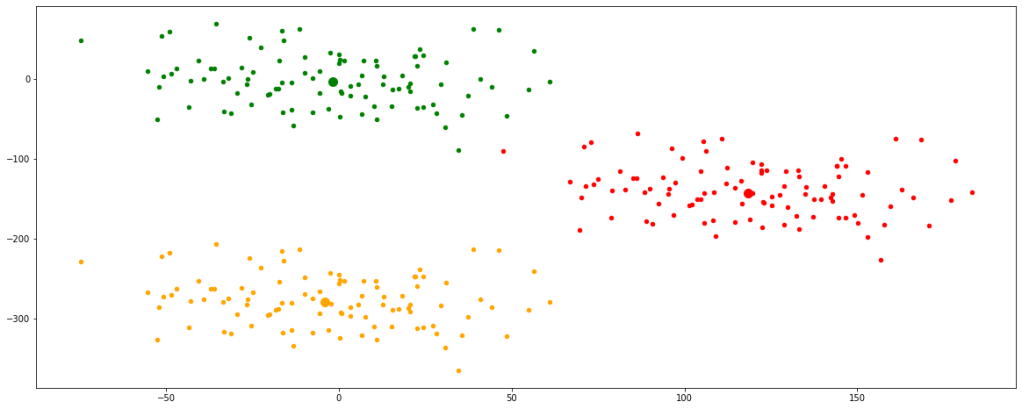
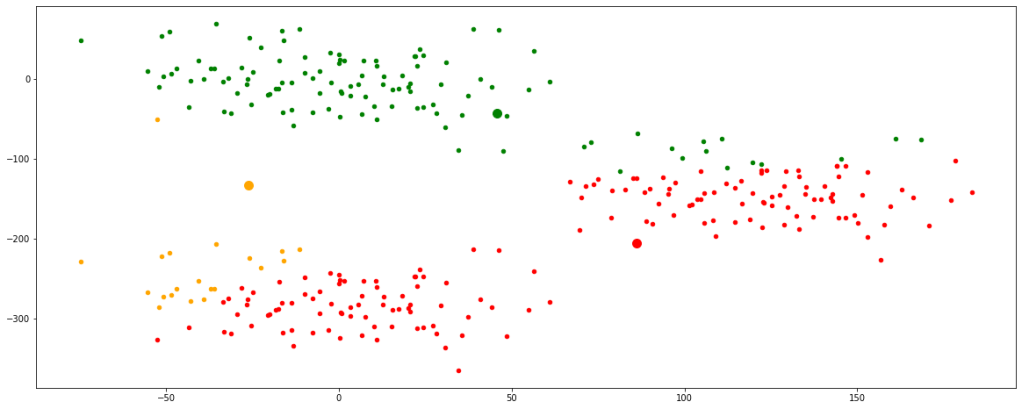
Now, we can see that the centroids have moved a bit and are tending towards their respective clusters. After multiple iterations, we will find the centroids not changing any further and thus we would have finally achieved the final set of clusters.

Let’s look at multiple iterations by accumulating all the above codes in a single function for our ease of execution. We would see every change occurring in the position of the centroids.

def clust(seeds):

    np.random.seed(seeds[0])
    a = np.random.randint(df.feature1.min(),df.feature1.max())
    b = np.random.randint(df.feature2.min(),df.feature2.max())

    np.random.seed(seeds[1])
    c = np.random.randint(df.feature1.min(),df.feature1.max())
    d = np.random.randint(df.feature2.min(),df.feature2.max())

    np.random.seed(seeds[2])
    e = np.random.randint(df.feature1.min(),df.feature1.max())
    f = np.random.randint(df.feature2.min(),df.feature2.max())
    
    plt.figure(figsize=(20,8))
    plt.scatter(df.feature1,df.feature2)
    plt.scatter(a,b, color='green', s=100)
    plt.scatter(c,d, color='orange', s=100)
    plt.scatter(e,f, color='red', s=100)
    plt.show()


    def euc(x1,x2,y1,y2):
        dist = ((x1-x2)**2 + (y1-y2)**2)**0.5
        return dist


    for i in range(5):
        cluster1 = euc(a,df.feature1,b,df.feature2)
        cluster2 = euc(c,df.feature1,d,df.feature2)
        cluster3 = euc(e,df.feature1,f,df.feature2)


        cluster = pd.concat([cluster1,cluster2,cluster3], axis=1)
        cluster.columns=['cluster1','cluster2','cluster3']


        dic = {}
        for i in cluster.index:
            dic[i]=cluster.columns[np.argmin(cluster.iloc[i])]

        df['cluster'] = dic.values()

        
        plt.figure(figsize=(20,8))
        plt.scatter(a,b, color='green', s=100)
        plt.scatter(c,d, color='orange', s=100)
        plt.scatter(e,f, color='red', s=100)


        new = df[df.cluster=='cluster1']
        plt.scatter(new.feature1,new.feature2, color='green', s=20)
        a=new.feature1.mean()
        b=new.feature2.mean()

        new = df[df.cluster=='cluster2']
        plt.scatter(new.feature1,new.feature2, color='orange', s=20)
        c=new.feature1.mean()
        d=new.feature2.mean()

        new = df[df.cluster=='cluster3']
        plt.scatter(new.feature1,new.feature2, color='red', s=20)
        e=new.feature1.mean()
        f=new.feature2.mean()

        plt.show()
clust([55,100,8000])

Now, we have finally obtained 3 valid clusters after 6 iterations. Analogically similar processes would be followed in higher dimension data sets as well.

K-Means clustering can be performed using the ‘sklearn’ library in python. You can read more about this by clicking here.

This kind of clustering has some drawbacks as well. Some of them being they are only valid for numeric data types. They cannot handle categorical data types. Moreover, K-Means do not perform well with outliers since if there is any, the updation of centroids would be highly affected and will get skewed towards the outlier. It does not perform well even with data sets with varying data densities.

—END—

Chi-square Test

This is a pretty short and simple way to verify our hypothesis. This test simply suggests whether a given categorical feature in a dataframe is significant for prediction of the dependent variable or not. We will move straight towards performing a simple test.

Let us consider the null hypothesis to be that a given feature is insignificant whereas the alternate hypothesis to be that the feature is significant enough.

As usual, first of all let’s build an arbitrary dataframe for our purpose.

dic = {'very_short': [12,  3, 15],
       'short': [16,  9, 25],
       'moderate': [ 2, 13, 15],
       'long': [ 5, 35, 40],
       'very_long': [12,  7, 19],
       'total': [ 47,  67, 114]}

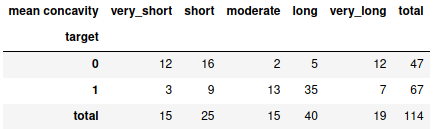
obs = pd.DataFrame(dic).rename(index={2:'total'})
obs

Note: This dataframe is created as the form of replica when crosstab fuction is applied on any pandas dataframe. You can read about crosstab here.

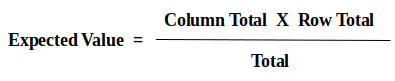
Here, we are going to find the significance of the feature length (very short, short, moderate, long, very long) with respect to the binary class (1 and 0). Otherwise, the information in the dataframe is self-explainable. All the values here are called the observed values. With respect to this, we need to calculate the expected values. The way to calculate the expected values is as follows:

For eg., at (0,0) value will be = (47*15)/114 ; at (1,3) value will be = (67*40)/114

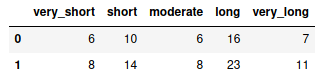
Therefore, the expected values are as follows:

arr = np.array(obs)

rows = arr[:-1,:-1].shape[0]
cols = arr[:-1,:-1].shape[1]


for row in range(0,rows):
    for col in range(0,cols):
        arr[row,col] = ((arr[row,5]*arr[2,col])/arr[rows,cols])
        
arr = arr[:-1,:-1]

exp = pd.DataFrame(arr, columns=obs.columns[:-1], index=obs.index[:-1])
exp

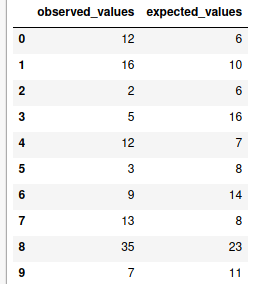
Now all the corresponding observed and expected values are listed.

obs_vals = [obs.loc[row,col] for row in obs.iloc[:-1,:-1].index for col in obs.iloc[:-1,:-1].columns]
exp_vals = [exp.loc[row,col] for row in exp.index for col in exp.columns]
chi = pd.DataFrame({'observed_values':obs_vals, 'expected_values':exp_vals})
chi

There are some other subsequent calculations are involved as well which could be self explained through the following table:

chi['observed_values - expected_values'] = chi.observed_values - chi.expected_values
chi['square(observed_values - expected_values)'] = chi['observed_values - expected_values']**2
chi['square(observed_values - expected_values)/expected_values'] = chi['square(observed_values - expected_values)'] / chi.expected_values
chi
chi_square = chi['square(observed-expected)/expected'].sum()
chi_square

The summation of the last column, i.e., ‘the square of difference of observed and expected values divided by the expected values’ gives us the value of the calculated chi-square (χ2) which comes out to be 39.15

Now, it is time to work out the degree of freedom. Degree of freedom (DOF) is given by the following expression:

DOF = (No. of rows – 1) * (No. of columns – 1)

dof = (rows-1)*(cols-1)
dof

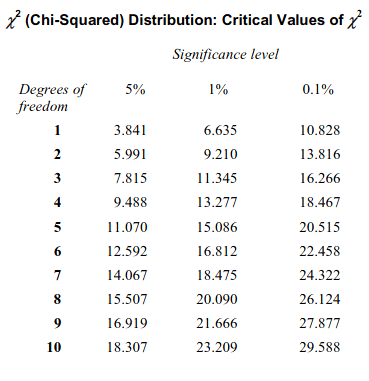
Using the above code we can find the degree of freedom to be 4. Now, we can find the critical value of chi-square from the Chi-Squared distribution table, provided below based on the calculated degree of freedom:

From the above table, we can see that for degree of freedom 4 and 0.1% significance level, critical value of chi-squared is 18.467.

Since , therefore, the mentioned feature is significant for prediction.

Thus, we can reject the null hypothesis and accept the alternate hypothesis.

Had the condition been vice versa, i.e., calculated chi-squared is less than the critical chi-squares, then we would have failed to reject the null hypothesis.

—END—

Principle of Support Vector Machines Classification

It is one of the most important and effective way of classification. To simply put the working mechanism of the algorithm is that it tries fixing a line (in case of 2 dimensional data), plane (in 3 dimensional data) or a hyperplane (in case of any more than 3 dimensional data).

For simplicity, let’s first see the construct in case of a 2 dimensional data. I will first be constructing an arbitrary data set.

# Some important imports

import pandas as pd, numpy as np, matplotlib.pyplot as plt, seaborn as sns

from sklearn.svm import SVC
import plotly.express as px
def making_df(slope_type=1,n=100, p1=100, p2=30, p3=2):
    np.random.seed(n)

    p=np.random.randn(p1)*p2
    q=np.random.randn(p1)*p2
    
    if slope_type == 1:        
        r=p+p3*p.max()
        s=q-p3*q.max()
    else:
        r=p+p3*p.max()
        s=q+p3*q.max()        


    df1 = pd.DataFrame({'ones':np.ones(len(p)),'feature1':p,
                       'feature2':q, 'label':np.ones(len(p))})

    df2 = pd.DataFrame({'ones':np.ones(len(r)),'feature1':r,
                       'feature2':s, 'label':[-1]*len(r)})

    df = pd.concat([df1,df2], axis=0)
    df = df.sample(n=len(df))
    return [df,p,q,r,s]

Without focusing much on the code, let’s just take it for granted that the above function returns a dataframe with two visually distinct clusters of data points which we can classify as two classes. It also returns the coordinates of the two classes: (p,q) for negative data points and (r,s) for positive data points. It takes the type of slope (whether positive or negative) and a number of parameters as input for creating the required dataframe The above function has been constructed since we may require to create dataframes multiple times for practicals.

The general equation of a straight line can be written as:

ax + by + c = 0

where x and y are variables.

slope = -(a/b) ; intercept = -(c/b)

Without much pondering let’s first create an arbitrary dataframe and plot it to get a visual representation and take a look toward what we are dealing with at the first place.

obt = making_df(slope_type=1,n=40)

df = obt[0]
p = obt[1]
q = obt[2]
r = obt[3]
s = obt[4]


plt.figure(figsize=(20,8))
plt.scatter(p, q, facecolors='purple', marker='_', s=100)
plt.scatter(r,s, facecolors='red',marker='+', s=100)
plt.xlabel('Features', fontsize=16)
plt.ylabel('Label', fontsize=16)


plt.show()

Now we clearly have a data set with distinguished data points, conveniently labeling ‘+1’ and ‘-1’.

def primary_fit(weight):

    def nor(lst):
        factor = (1/sum([i**2 for i in lst[:2]]))**0.5
        return [i*factor for i in lst[:2]]

    a = nor(weight)[0]
    b = nor(weight)[1]
    c = weight[2]


    def st(a,b,c):
        slope = -(a/b)
        intercept = -(c/b)

        x = np.concatenate([p,r])
        y = slope*x + intercept

        plt.plot(x,y)

        return [slope,intercept]


    plt.figure(figsize=(20,8))
    plt.scatter(p, q, facecolors='purple', marker='_', s=100)
    plt.scatter(r,s, facecolors='red',marker='+', s=100)
    plt.xlabel('Features', fontsize=16)
    plt.ylabel('Label', fontsize=16)

    st(a,b,c)
    plt.show()

We can attempt to fit a line with a = -1, b = 1, c = 110

primary_fit([-1,1,110])

With the selected values of a, b, and c, we successfully fit a line, ax+by+c=0, within the data points that segregates the points in two distinct clusters. This line is also known as a hyperplane. Dimensions of this hyperplane increases with increase in dimensions of data. Analogically, it could be a 2D plane if we have 3D data, might be a cube in 4D data set or even a tesseract in a 5D data set and so on.

Looking at the graph it would be fair to say for any values of x and y, if ax + by + c > 0, it can be classified as ‘-1’ and for ax + by + c < 0, it can be classified as ‘+1’.

If we try using different values of a, b, and c, we may get different lines accordingly. Let’s try fitting another line with a = -1, b = 3, c = 80

primary_fit([-1,3,80])

We get entirely different lines with each chosen values of a, b, and c.

There are mainly two problems that persists. First one is that values of a, b, and c must be optimized to get the best fit line. Second one is that during implementation of the model, there may be data points appearing out of the blue which may be too close to the classifier or may lie on the opposite side of the classifier resulting in wrong classification.

In order to cope with these issues, concepts of margins are introduced. Let’s take a dive and try to understand the underlying concepts.

Simply put, margins can be referred as the extensions of the classifier. It is sum of the distances from the classifier to the nearest data point of both of the classes.

SVM Formulation

li X (W . yi) ≥ M

The term (W . yi) is the distance which is a vector and therefore has the same sign as that of the class. Thus when the class is multiplied with the distance, the result will always be positive.

From the above derivation we can easily calculate the distance ‘d’ of a point P from a line. Now, let’s try fitting a classifier with the maximum margin, i.e., it would be at the farthest most distance from the classifier’s closest data points of the both classes.

def sup(weight, epsilon=0):
    def nor(lst):
        factor = (1/sum([i**2 for i in lst[:2]]))**0.5
        return [i*factor for i in lst[:2]]

    a = nor(weight)[0]
    b = nor(weight)[1]
    c = weight[2]

    def st(a,b,c):
        slope = -(a/b)
        intercept = -(c/b)

        x = np.concatenate([p,r])
        y = slope*x + intercept

        return [x,y]


    df['distances'] = np.matmul(np.array(df.iloc[:,:3]),np.array([c,a,b]))

    df['formulation'] = df.label * df.distances
    
    if -(a/b)>0:
        df_neg = df[df.label<0].sort_values('formulation')
        df_pos = df[df.label>0].sort_values('formulation')
    elif -(a/b)<0:
        df_neg = df[df.label<0].sort_values('formulation', ascending=False)
        df_pos = df[df.label>0].sort_values('formulation', ascending=False)


    neg_dist = df_neg.formulation.values[0]
    pos_dist = df_pos.formulation.values[0]


    def vert_dist(distance):
        import math
        slope = -(a/b)
        angle = abs(math.degrees(math.atan(slope)))
        vertical = distance/math.cos(math.radians(angle))
        return vertical

    neg_vert_dist = vert_dist(neg_dist)
    pos_vert_dist = vert_dist(pos_dist)


    intercept = -(c/b)
    pos_intercept = intercept + pos_vert_dist
    neg_intercept = intercept - neg_vert_dist
    c_intercept = min([neg_intercept, pos_intercept]) + abs((neg_intercept - pos_intercept)/2)

    c_pos = -(pos_intercept*b)
    c_neg = -(neg_intercept*b)
    c_new = -(c_intercept*b)


    if epsilon != 0:
        
        margin = (neg_dist+pos_dist)*(1-epsilon)
        distance = margin/2
        dist_vert_dist = vert_dist(distance)
            
        pos_intercept = c_intercept + dist_vert_dist
        neg_intercept = c_intercept - dist_vert_dist
        c_pos = -(pos_intercept*b)
        c_neg = -(neg_intercept*b) 


    plt.figure(figsize=(20,8))
    plt.scatter(p, q, facecolors='purple', marker='_', s=100)
    plt.scatter(r,s, facecolors='red', marker='+', s=100)
    plt.xlabel('Features', fontsize=16)
    plt.ylabel('Label', fontsize=16)

    plt.plot(st(a,b,c_new)[0], st(a,b,c_new)[1], linewidth=3.5, label='classifier')
    plt.plot(st(a,b,c_pos)[0], st(a,b,c_pos)[1], '--', linewidth=1, alpha=0.8, label='negative margin')
    plt.plot(st(a,b,c_neg)[0], st(a,b,c_neg)[1], '--', linewidth=1, alpha=0.8, label='positive margin')
    plt.legend()
    plt.show()

Note :- The above function is just for visualization and demonstration purpose only for getting a better understand only. It does not represent the actual model building in any way.

weights = [-1,1,110]
sup(weights)
Figure 1

The negative and positive margin lines pass through the classifier’s closest negative and positive data points respectively. But there could be cases when the data points are in the close proximity of the classifier. During those scenarios, the model tries to overfit by shrinking the margin since the model always tends to attain the ideal condition of producing 0 errors. Let’s visualize this.

sup(weights, overfit=True)
Figure 2

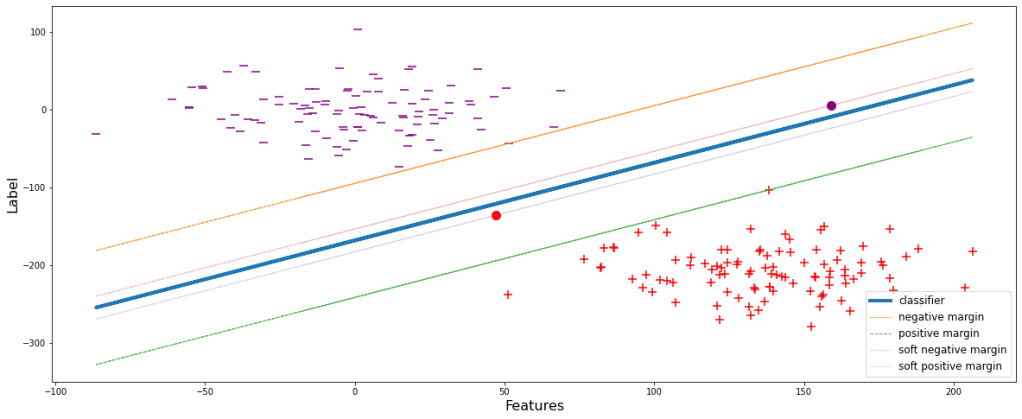
This will obviously perform well during training but the major drawback is that since the margin is small, i.e. the decision boundary is shrinked, the model will definitely wrongly classify many of the classes during evaluation or testing. Let’s see it visually. During implementation of the overfitted model, let’s assume to get a data point belonging to positive classifier, yet appears above the negative margin. Therefore the model will wrongly classify it to be ‘-1’, eventually decreasing the accuracy.
sup(weights, overfit=True, test_pos_pos=30)
Figure 3

To deal with this problem, a slack variable (ϵ) is introduced which is incorporated with the SVM formulation. Let’s look at the effects and advantages:

li X (W . yi) ≥ M(1-ϵi)

We can infer from the mathematical expression itself that margin is inversely proportional to ϵ. ϵ denotes the magnitude of error, i.e., the amount of error that the model can compromise. Let’s set ϵ=0.6 and have a visual representation.

sup(weights, epsilon=0.6, show=True)
Figure 4

Now the model is generalized. Some data points during the training are allowed to pass through. These new set thresholds are termed as the soft margins of the respective classes. Soft margins are the boundaries upto which the training data points are allowed and compromised.

After building such a generalized model, let’s try reconsidering the same scenario as that in ‘Figure 3’ and see the consequences.

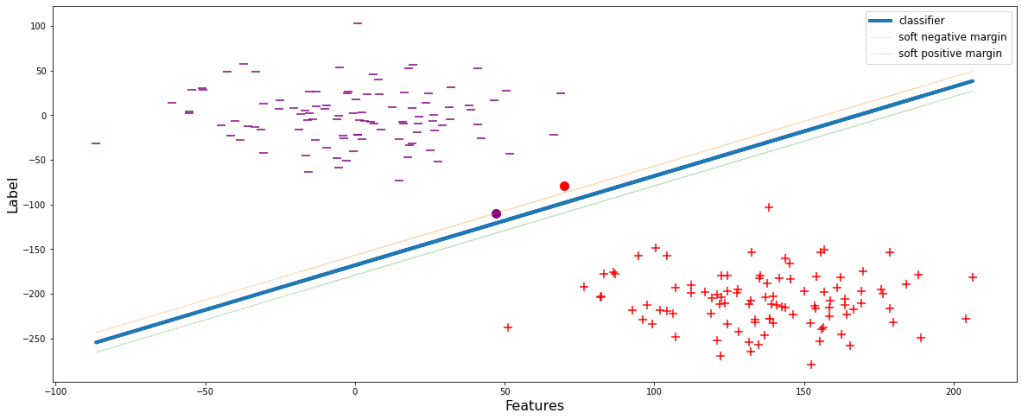
sup(weights, epsilon=0.6, test_pos_pos=48)
Figure 5

Unlike the model in Figure 3, the model will now not wrongly classify the data point depicted by the red dot since it is below the negative margin.

I hope we have successfully gone through the demonstration and understood the basic concepts well. Now let’s go through some additional stuffs. As we have seen that with increase in ϵ, the soft margin shrinks more and more. Eventually when ϵ reaches 0, the soft margins will lie over the classifier, since li X (W . yi) ≥ 0. Let’s have a look at different fits with different values of ϵ.

for i in np.arange(0.2,1.1,0.2):
    sup(weights, epsilon=i, show=True)
ϵ = 0.2
ϵ = 0.4
ϵ = 0.6
ϵ = 0.8
ϵ = 1.0

Greater the value of ϵ, simpler the model is since with a large value of ϵ, the model is flexible enough and tries to fit the classifier less aggressively.

All these postulates hold true if the classes are linearly separable but in real world scenario it is very likely to happen. Therefore, let’s just construct another dataframe which will more or less justify the real world scenario.

x = np.linspace(-5.0, 2.0, 100)
y = np.sqrt(10**2 + x**2)
y=np.hstack([y,-y])
x=np.hstack([x,-x])

x1 = np.linspace(-5.0, 2.0, 100)
y1 = np.sqrt(5**2 - x1**2)
y1=np.hstack([y1,-y1])
x1=np.hstack([x1,-x1])

df1 =pd.DataFrame(np.vstack([y,x]).T,columns=['X1','X2'])
df1['Y']=0
df2 =pd.DataFrame(np.vstack([y1,x1]).T,columns=['X1','X2'])
df2['Y']=1
df = df1.append(df2)

df.head()

Let’s look at the graphical representation of the data.

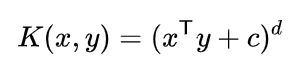
As we can see that these data points are not at all linearly separable. For classification of these kind of data, concept of Kernel has been introduced. Kernels are nothing but mathematical functions through which when the data points from different features are passed, they get transformed and consequently add dimensions to the original dataset. There are a number of different kernels available. Since the mathematical expressions are different, the transformations occur differently but their prime objective is similar. For simplicity of understanding, let’s consider one of the simplest kernel, ‘Polynomial Kernel‘.

Above mentioned is the mathematical expression for Polynomial kernel. Let’s calculate the transformation and have a look at the new dimensions formulated by the kernel. In our dataset, x and y are X1 and X2 respectively.

From the above derivation, we got 3 new dimensions, viz., square of X1 (X12), square of X2 (X22), and multiplication of X1 and X2 (X1X2). Let’s calculate these and integrate with the main dataframe.

df['X1_Square']= df['X1']**2
df['X2_Square']= df['X2']**2
df['X1X2'] = (df['X1'] *df['X2'])
df.head()

Now, let’s plot these 3 newly formed dimensions in a 3D graph.

# Creating dataset
df1 = df[df.Y==0]
a = np.array(df1.X1_Square)
b = np.array(df1.X2_Square)
c = np.array(df1.X1X2)
# p = lr_preds
  
# Creating figure
plt.figure(figsize = (13,13))
ax = plt.axes(projection ="3d")
  
# Creating plot
ax.scatter3D(a, b, c, s=8, label='class 0')


# Creating dataset
df1 = df[df.Y==1]
a = np.array(df1.X1_Square)
b = np.array(df1.X2_Square)
c = np.array(df1.X1X2)

  
# Creating plot
ax.scatter3D(a, b, c, s=8, label='class 1')


ax. set_xlabel('X1_Square', fontsize=13)
ax. set_ylabel('X2_Square', fontsize=13)
ax. set_zlabel('X1X2', fontsize=13)
plt.legend(fontsize=12)
 
ax.view_init(30,250)
  
# show plot
plt.show()

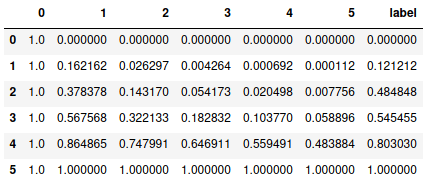
After applying the kernel, we can easily imagine to fit a 2D plane between the two classes with all other similar theoretical concepts as discussed earlier. Unlike before kernel execution, now there exists a hyperplane which can successfully classify both the classes efficiently. This could only become possible due to the introduction of additional dimensions over the initial 2D Cartesian plane.

I hope I could provide you with a clear understanding of the Support Vector Machine Classifier algorithm and the internal process followed by it. The practical implementation using automated process with libraries are not described here, but I can assure that if the working of the algorithm is clear, model building is pretty straightforward.

You can refer to this sklearn SVC documentation link to understand more about model building and the practical implementation.

—END—

Why overfitting is an issue and what are the probable solutions?

If you have gone through my Gradient Descent blog, you might have seen the demonstration of a model fits a line through the data points for prediction. The line that is fitted or preferably the model must be generalized. That simply means that the model must try to understand the basic trend rather than learning each and every data point by heart. Let’s try understanding with a demonstration. I would keep the demonstration as self-explainable as I can.

Alright, my current intention is to create an arbitrary dataframe so that I can produce an overfitting visualization. Let’s start by creating a very simple dataframe of 2 features and 6 rows of data points. Since topic is not regarding feature engineering, so I won’t be explaining this process of dataframe creation too much and rather would keep it short.

# Important imports
import warnings
warnings.filterwarnings('ignore')
 
import pandas as pd, numpy as np, matplotlib.pyplot as plt
 
from sklearn import datasets
from sklearn.linear_model import LinearRegression
 
from sklearn.metrics import mean_squared_error
from sklearn.preprocessing import MinMaxScaler, PolynomialFeatures

 
base = pd.DataFrame({'0':[22,28,36,43,54,59],
                  '1':[5,13,37,41,58,71]})
base

Now let’s transform the independent variable to 5th degree polynomial.

scaler = MinMaxScaler()
base[base.columns] = scaler.fit_transform(base[base.columns])

X = base.iloc[:,0]
y = base.iloc[:,1]

df = pd.DataFrame(PolynomialFeatures(5).fit_transform(sorted(X.values.reshape(-1,1))))
df['label'] = y
df

Now we have got a dataframe with 6 features and a label. Now using the same process and function as used in the Gradient Descent blog, let’s perform gradient descent for multiple features and fit a best fit line or curve. Then plot the predictions and actual values with respect to feature in the ‘base’ dataframe and look at the cost value.

def multi_gradient_descent(X, y, m_start=0, c=0, lrn=0.001, n_iters=25000):
    
    store = pd.DataFrame(columns= [f'm_of_{i}' for i in X.columns] + ['c', 'cost'])
    

#     m0=m1=m2=m3=m4=m5 = m_start
    ms = [{f'm{i}' : m_start} for i in X.columns]
    dic = {k:v for x in ms for k,v in x.items()}
    dic

    nos = 0
    while nos<=n_iters:

        res = []
        for i in range(len(X.columns)):
            mul = list(dic.values())[i] * X.iloc[:,i]
            res.append(mul)
        pred = sum(res) + c 
        

        m_gradients = []
        for i in range(len(X.columns)):
            grad = (sum((y - pred)*X.iloc[:,i]) * (-2/len(X)))
            m_gradients.append(grad)

        m_gradients = np.array(m_gradients)


        c_gradient = sum(y - pred) * (-2/len(X))


        k=0
        for i in dic.keys():
            dic[i] = dic[i] - lrn*m_gradients[k]
            k += 1
        
        
        c = c - lrn*c_gradient
        
        res = []
        for i in range(len(X.columns)):
            mul = list(dic.values())[i] * X.iloc[:,i]
            res.append(mul)
        predicted = sum(res) + c
        
        
        cost = mean_squared_error(y,predicted)
        
        store.loc[nos] = list(dic.values())+[c,cost]
        
        
        nos += 1

    return store


X = df.drop('label', axis=1)
y = df.label

obt = multi_gradient_descent(X,y,lrn=0.1,n_iters=20000)

min_cost = obt[obt.cost == obt.cost.min()]

m_overfit = np.array(min_cost.iloc[0,:-2])
c_overfit = min_cost.c.values[0]

preds_overfit = np.matmul(X, m_overfit) + c_overfit


plt.figure(figsize=(20,8))
plt.scatter(base.iloc[:,0], y, s=100, c='blue')
plt.plot(base.iloc[:,0], preds_overfit, color='red', linewidth=3)
plt.xlabel('feature', fontsize=14)
plt.ylabel('label', fontsize=14)
plt.show()

print('Cost =',mean_squared_error(y,preds_overfit))

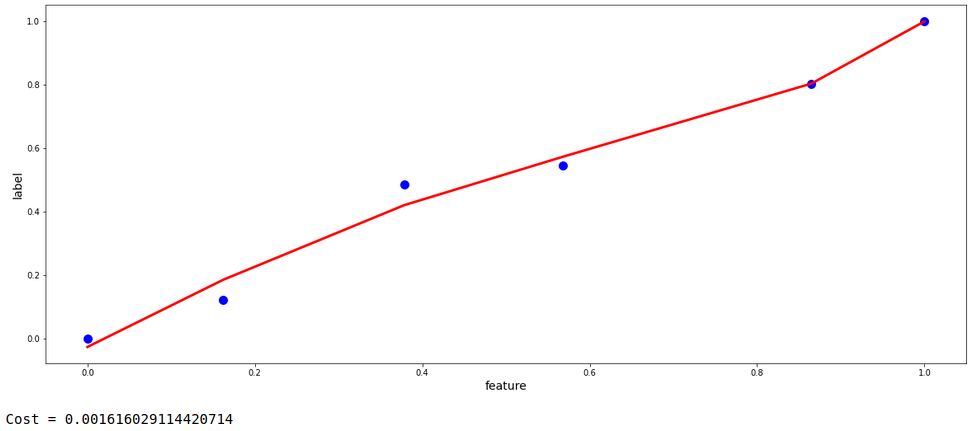
Looking at the model above, it is evident that the model is moderately overfitting. The model is not generalized, rather is trying to learn all the provided data points as it is by compromising the errors and learning the noise in the data set as well . If we extend the graph using the same coefficients as obtained during the process of gradient descent, it can be imagined that the predictions would not be fair and could have bias for future data.
To resolve this problem, Regularization is performed. Two of the most common process of regularization are Ridge and Lasso Regression.

Regularization

The approach is simple : we add a term to the cost function.

Ridge Regression Cost = MSE(m) + λ*||m||²

where m is the slope, λ is a constant. Mean squared error is calculated at m and the term λ*||m||² is added to it.

The gradients are found by differentiating this entire cost function itself and during each iteration, slopes and intercepts are updated using these gradients.

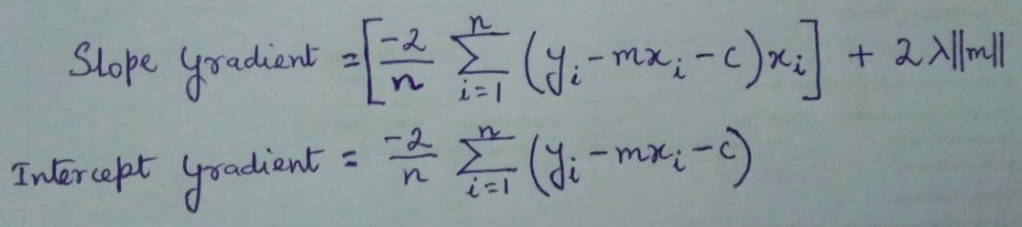
Therefore, the gradients for this are as follows:-

From the equations it is clear that slop gradient is directly proportional to λ. Therefore as λ increases, updated slope decreases given that learning rate is constant. More the value of λ, rapid the decrease of slope will occur. The slopes will consequently tend towards 0 but will never actually 0. This is mathematically represented below.

updated_m  =  learning rate * slope gradient
For updated_m to be 0 in Ridge Regression, the following has to me true:
   m  =  learning rate * slope gradient
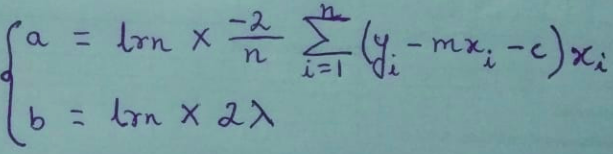
=> m  =  a + ( b * ||m|| )

where,


Since m ≠ a + ( b * ||m|| ) due to the presence of ||m|| on the RHS,
Therefore, updated_m cannot be 0.

In the other type of regularization, i.e., Lasso Regression, λ*||m|| is added to the regular cost function instead of λ*||m||² . This brings some changes like in the slope gradient, the last term will be only λ instead of 2*λ*||m||. This will eventually cause many slopes of certain features turn to 0, which is explained below.

updated_m  =  learning rate * slope gradient
For updated_m to be 0 in Lasso Regression, the following has to me true:
   m  =  learning rate * slope gradient
=> m  =  a + b

where a is same as before whereas,
b = learning rate * λ

Therefore for Lasso Regression, updated_m can absolutely be 0.

For today’s topic, let’s use Ridge Regression for regularization. Below is give the function for multiple gradient descent with the corresponding cost function. If you notice carefully, the gradient equation has also be changed accordingly.

def multi_regular_gradient_descent(X, y, lamda=0.01, m_start=0, c=0, lrn=0.001, n_iters=25000):
    
    store = pd.DataFrame(columns= [f'm_of_{i}' for i in X.columns] + ['c', 'cost'])
    

    ms = [{f'm{i}' : m_start} for i in X.columns]
    dic = {k:v for x in ms for k,v in x.items()}
    dic

    nos = 0
    while nos<=n_iters:

        res = []
        for i in range(len(X.columns)):
            mul = list(dic.values())[i] * X.iloc[:,i]
            res.append(mul)
        pred = sum(res) + c
            

        m_gradients = []
        for i in range(len(X.columns)):
            abs_slopes = [abs(i) for i in list(dic.values())]
            grad = (sum((y - pred)*X.iloc[:,i]) * (-2/len(X))) + (2*lamda*abs_slopes[i])
            m_gradients.append(grad)

        m_gradients = np.array(m_gradients)


        c_gradient = sum(y - pred) * (-2/len(X))


        k=0
        for i in dic.keys():
            dic[i] = dic[i] - lrn*m_gradients[k]
            k += 1
        
        
        c = c - lrn*c_gradient
        
        res = []
        for i in range(len(X.columns)):
            mul = list(dic.values())[i] * X.iloc[:,i]
            res.append(mul)
        predicted = sum(res) + c
        
        
        cost = mean_squared_error(y,predicted)
        
        store.loc[nos] = list(dic.values())+[c,cost]
        
        
        nos += 1


    return store

As the function has been defined, let’s perform gradient descent in the same dataset. If you have already gone through my Gradient Descent blog, you will be familiar with almost all the parameters. Parameters: λ = 0.1, learning rate = 0.1, number of iterations = 20,000, m and c both starting with 0.

X = df.drop('label', axis=1)
y = df.label

obt = multi_regular_gradient_descent(X,y,lamda=0.1,lrn=0.1,n_iters=20000)

min_cost = obt[obt.cost == obt.cost.min()]

m_regular = np.array(min_cost.iloc[0,:-2])
c_regular = min_cost.c.values[0]

preds_regular = np.matmul(X, m_regular) + c_regular


plt.figure(figsize=(20,8))
plt.scatter(base.iloc[:,0], y, s=100, c='blue')
plt.plot(base.iloc[:,0], preds_regular, color='red', linewidth=3)
plt.xlabel('feature', fontsize=14)
plt.ylabel('label', fontsize=14)
plt.show()

print('Cost =',mean_squared_error(y,preds_regular))

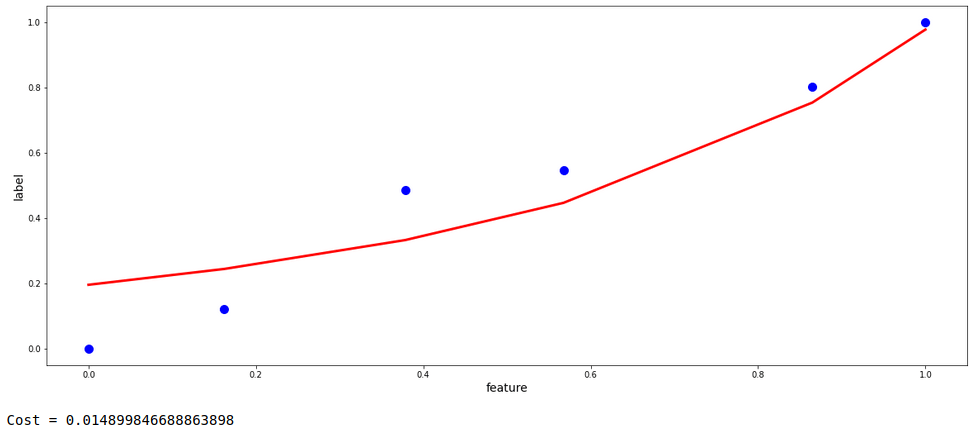
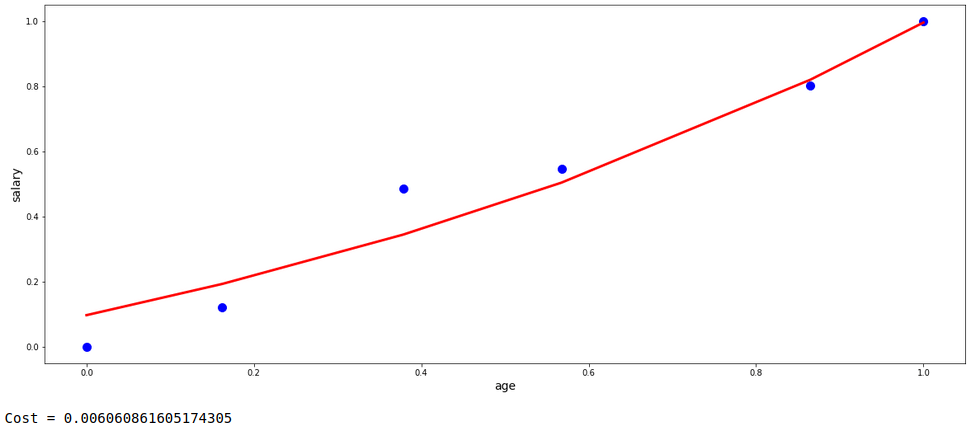
Now, this model’s fit is pretty much generalized without any aggressive tendency to fit to the data points. Let’s do the same with the automated process provided by the ‘scikit-learn’ library in python and compare them both with respect to fit and the cost value.

lr = Ridge(alpha=0.1).fit(X,y)
preds_lr = lr.predict(X)

plt.figure(figsize=(20,8))
plt.scatter(base.iloc[:,0], y, s=100, c='blue')
plt.plot(base.iloc[:,0], preds_lr, color='red', linewidth=3)
plt.xlabel('age', fontsize=14)
plt.ylabel('salary', fontsize=14)
plt.show()

print('Cost =',mean_squared_error(y,preds_lr))

Even if both are not precisely the same, but still we got a fairy good degree of regularization with almost similar cost value and curve fit structure.

Remember, it is always recommended to use the trusted tools and libraries available to build models instead of any scratch coded functions like the one I presented. These scratch codes are just for showing an overview of the back-end processes.

I hope I could explain the concepts. For any suggestion, feel free to contact me.

—END—

Gradient Descent

One of the most important topics in the field of machine learning is Gradient Descent which can be quite baffling at times. So, let us take a trip to understand the concept by getting our hands dirty with experiments and visualizations. I am going to use python programming language throughout the demonstrations.

First of all, what is Gradient Descent. Simply put, it is an algorithm working in the back-end of many regression model algorithms to fit a perfect fit line in a set of data points. We will be discussing everything in detail.

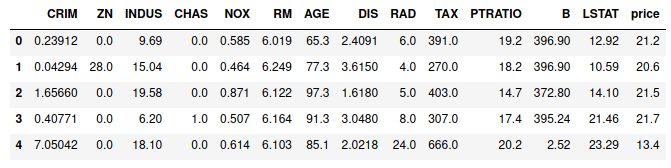
Let us take a classic example of the ‘Boston Housing Data Set’ for today’s discussion. The first few rows of data are presented below.

# Important imports
import warnings
warnings.filterwarnings('ignore')

import pandas as pd, numpy as np, matplotlib.pyplot as plt, seaborn as sns
from mpl_toolkits import mplot3d

from sklearn import datasets
from sklearn.linear_model import LinearRegression

from sklearn.metrics import mean_squared_error

# Loading dat
boston = datasets.load_boston()

# Creating dataframe
df = pd.DataFrame(boston['data'],columns=boston['feature_names'])
df['price'] = boston['target']

# Shuffling the dataframe
df = df.sample(n=len(df), random_state=20).reset_index(drop=True)

df.head()

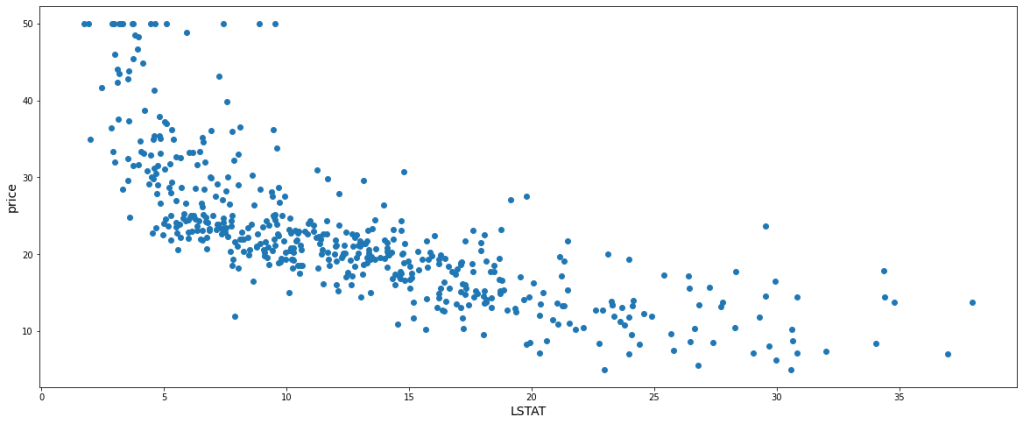
Let’s not dive deep into the meaning of each feature, rather let us just consider the existence of the above features as it is. ‘price’ column is the target variable that is to be predicted based on the other features. That is enough of the data introduction. For simplicity, let us consider one independent feature and the dependent variable itself for the demo. ‘LSTAT’ has been chosen among the independent variables since it has a good linear relationship with ‘price’ which will be visually efficient to understand. Hence, the scatter plot of our data, ‘LSTAT’ being in the x-axis and ‘price’ being in the y-axis is as follows:-

plt.figure(figsize=(20,8))
plt.scatter(df.LSTAT, df.price)
plt.xlabel('LSTAT', fontsize=14)
plt.ylabel('price', fontsize=14)
plt.show()

Now for prediction, we can perform Linear Regression. As the name suggests, linear regression refers to a process of fitting a linear instance of a curve, i.e., a straight line. The straight line is to be fit in such a way that the cost function is minimum or ideally 0.

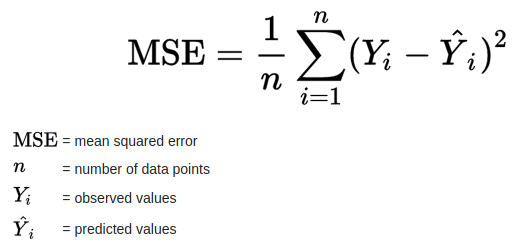
Here the cost function is Mean Squared Errors (MSE) which is nothing but the mean of all the squares of all vertical distances from each data point to the straight line. Mathematically, it can be summarized as follows :

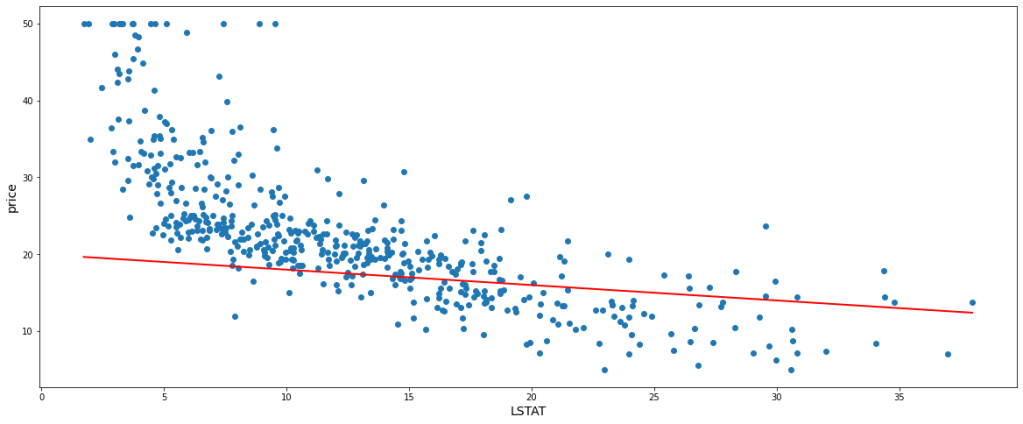
Now, the straight line that is to be fitted has a general equation y = mx + c where ‘m’ is the slope and ‘c’ is the intercept. These are the two parameters that structure and place the straight line. Let’s just fit a random line, say m = -0.2, c = 20, and get a glimpse.

# 'best_fit' is the custom function to fit the straight line with the provided coefficient and intercept
def best_fit(X,y,m,c):
     
    plt.figure(figsize=(20,8))
     
    # A scatter plot is produced for the data points
    plt.scatter(X, y)
     
    x = X.sort_values()
    # predictions are made based on the passed value of m and c
    predics = [(i*m)+c for i in x]
     
    # The predicted line is plotted in the same scatter plot graph
    plt.plot(x,predics, color='red', linewidth=2)
    plt.xlabel('LSTAT', fontsize=14)
    plt.ylabel('price', fontsize=14)
    plt.show()
    
############################################################################
 
best_fit(df.LSTAT,df.price,-0.2,20)

According to the above-fitted line, the predicted value of any value of x would be Ŷi = (-0.3 * xi) + 20 and the actual values (Yi) we already have. Therefore, we can easily calculate the value of the cost function which is equal to 92.75

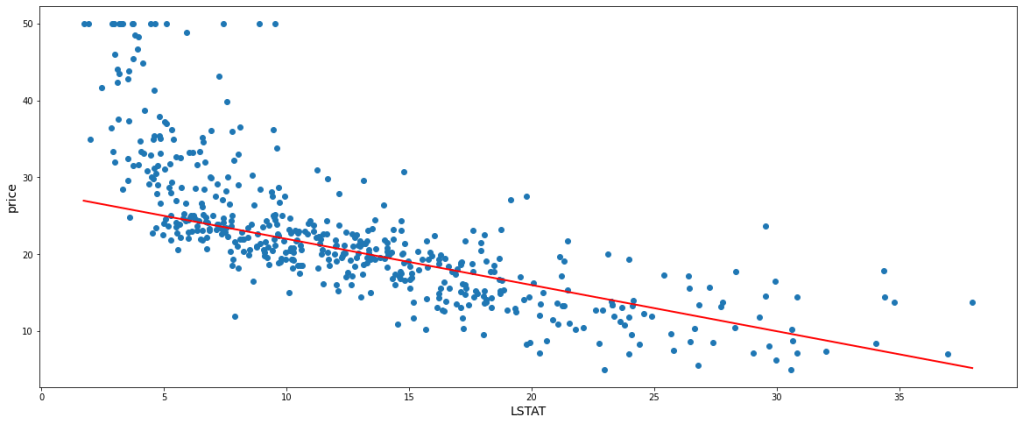
Let us take another instance with slight tweaking of m and c and fitting a new straight line at m = -0.6, c = 28. In this case, we get 49.23 as the cost function value. Below is the new model.

best_fit(df.LSTAT,df.price,-0.6,28)

This is evidently clear that if we can select a certain value of ‘m’ and ‘c’, we can attain a perfect fit straight line with a minimum cost function. But we can not choose values of m and c randomly, rather we need a systematic approach. For this purpose, the Gradient Descent algorithm comes into play.

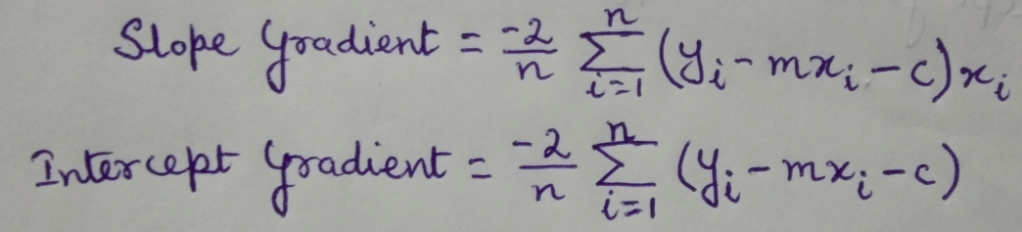
Let us get introduced to new terminology, Learning Rate. Here, it simply refers to a value that controls the change in slope and intercepts on the basis of cost function every time we build a new model. Slope and intercept gradients can be calculated by partial derivative of the cost function with respect to ‘m’ and ‘c’ respectively.

# 'gradients' function returns
def gradients(X,y,m,c):
    
    # Number of rows of data points
    N = len(X)
    
    # Prediction is done
    predicted = (m*X) + c
    
    # Gradients are calculated
    m_gradient = sum((y-predicted)*X)*(-2/N)
    c_gradient = sum(y-predicted)*(-2/N)
    return [m_gradient, c_gradient]


gradients(df.LSTAT,df.price,-0.2,20)

We have already seen a model previously at m = -0.2 and c = 20. Let the learning rate be = 0.001 On calculating the gradients with the above formulae, we get slope gradient = -51.79 and intercept gradient = -10.13 Now based on the learning rate and the gradients, the following set of formulae give the updated slope and intercept.

m = -0.2
c = 20
lrn = 0.001

# Slope gradient
m_gradient = gradients(df.LSTAT, df.price, m, c)[0]

# Intercept gradient
c_gradient = gradients(df.LSTAT, df.price, m, c)[1]
m = m - (lrn*m_gradient)
c = c - (lrn*c_gradient)

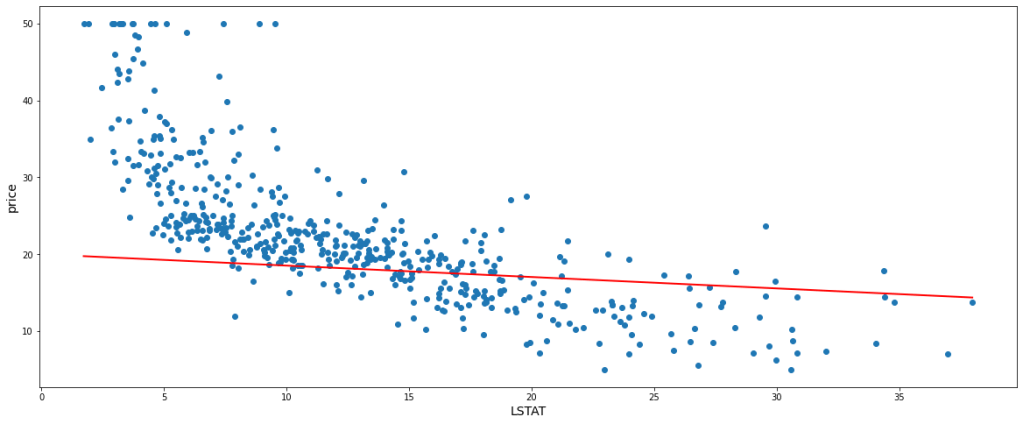
After updating the new slope, m = -0.14 and the new intercept, c = 20.01 With this new m and c, let’s fit a line within the data points and find the value of the cost function.

best_fit(df.LSTAT,df.price,m,c)

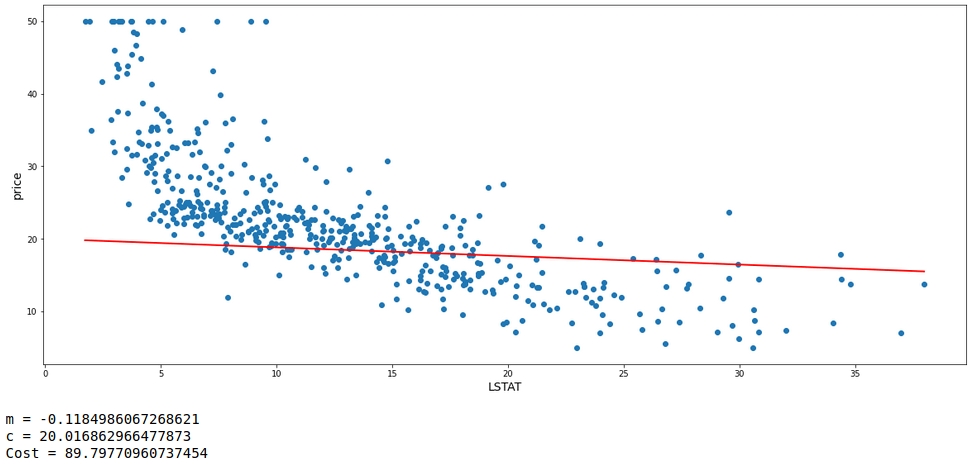
The model has a cost function value of 90.56 which is definitely less than the first model. Again we can update the values of m and c based on the values of learning rate and gradients and fit a new model which will hopefully give an improved fit with fewer errors. Thus we are going to see 2 more subsequent model fits each with a new updated value of m and c from its preceding model. We will also look at the values of m, c, and cost functions of each model.

m = m - (lrn*gradients(df.LSTAT, df.price, m, c)[0])
c = c - (lrn*gradients(df.LSTAT, df.price, m, c)[1])

best_fit(df.LSTAT,df.price,m,c)
print('m =',m)
print('c =',c)
print('Cost =',mean_squared_error(df.price, (m*df.LSTAT)+c))
m = m - (lrn*gradients(df.LSTAT, df.price, m, c)[0])
c = c - (lrn*gradients(df.LSTAT, df.price, m, c)[1])

best_fit(df.LSTAT,df.price,m,c)
print('m =',m)
print('c =',c)
print('Cost =',mean_squared_error(df.price, (m*df.LSTAT)+c))

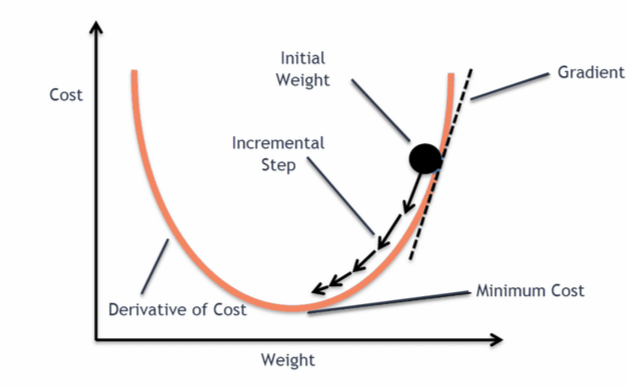
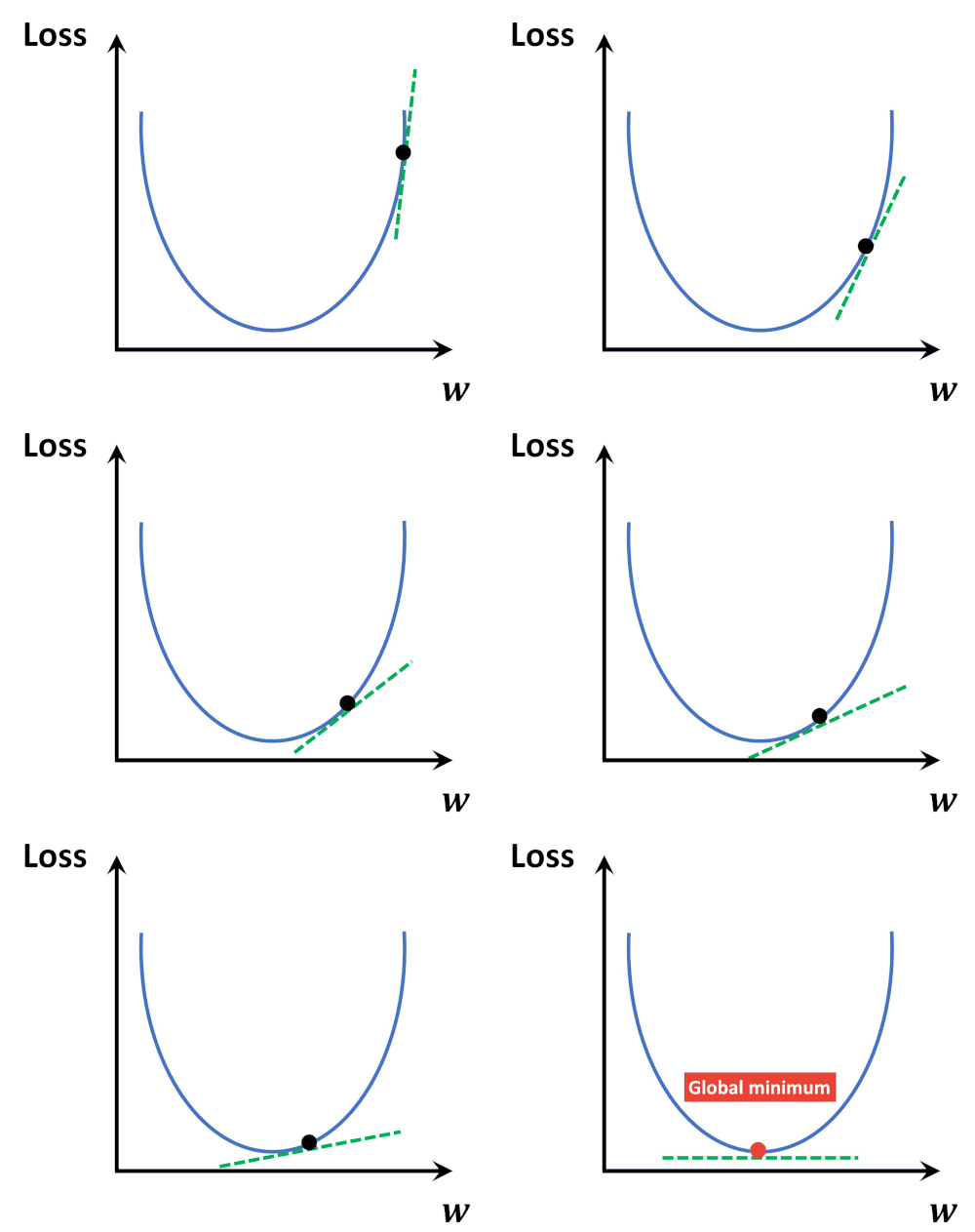
It can clearly be seen that the errors are gradually decreasing. Thus after multiple iterations, it is probable to get a model with minimum error. It is like a ball freely rolling down a slope to reach the global minimum point of derivative of cost function.

In order to graphically establish the above-stated fact, a classic example image (Image Source) and animation (Animation Source) has been provided below for better understanding.
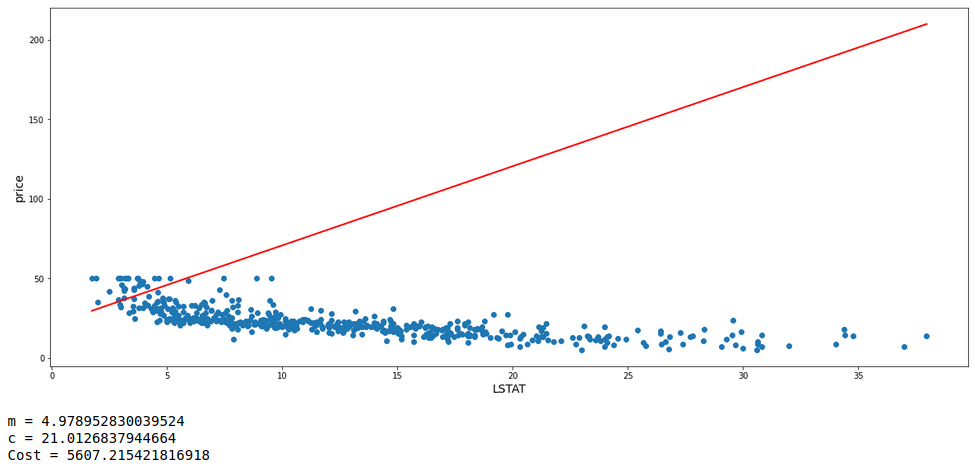
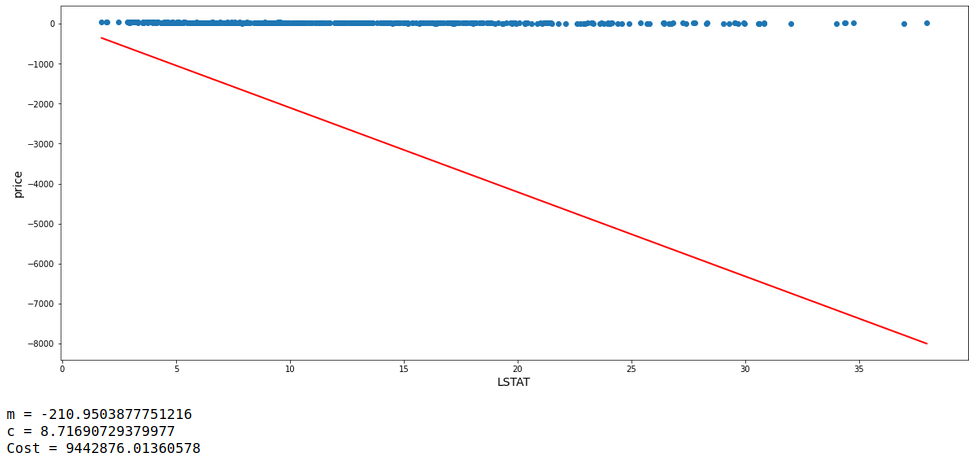
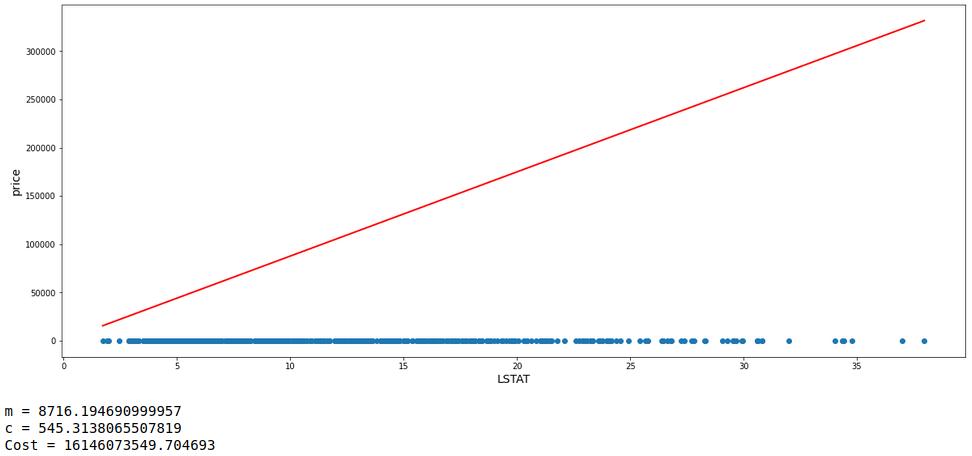
One fact to be kept in mind is that the learning rate can not be too large because in case it is too large, each leap will be large enough for the weight to ever reach the optimum level for the cost to be minimum. Let us see a demonstration of 3 consecutive models with m starting at -0.2, c at 20, and a high learning rate = 0.1 Along with each model, we will also have a look at the values of m, c, and cost.
lrn = 0.1
iters = 3

m=-0.2
c=20
m_gradient = gradients(df.LSTAT,df.price,m,c)[0]
c_gradient = gradients(df.LSTAT,df.price,m,c)[1]
print('\n\n')

i=1
while i<=iters:
    m = m-(lrn*m_gradient)
    c = c-(lrn*c_gradient)
    m_gradient = gradients(df.LSTAT,df.price,m,c)[0]
    c_gradient = gradients(df.LSTAT,df.price,m,c)[1]
    best_fit(df.LSTAT,df.price,m,c)
    print('m =',m)
    print('c =',c)
    print('Cost =',mean_squared_error(df.price, (m*df.LSTAT)+c))
    print('\n\n')
    i += 1

With the learning rate set high, it can be seen that the value of m is oscillating up and down instead of converging to the minimum cost value.

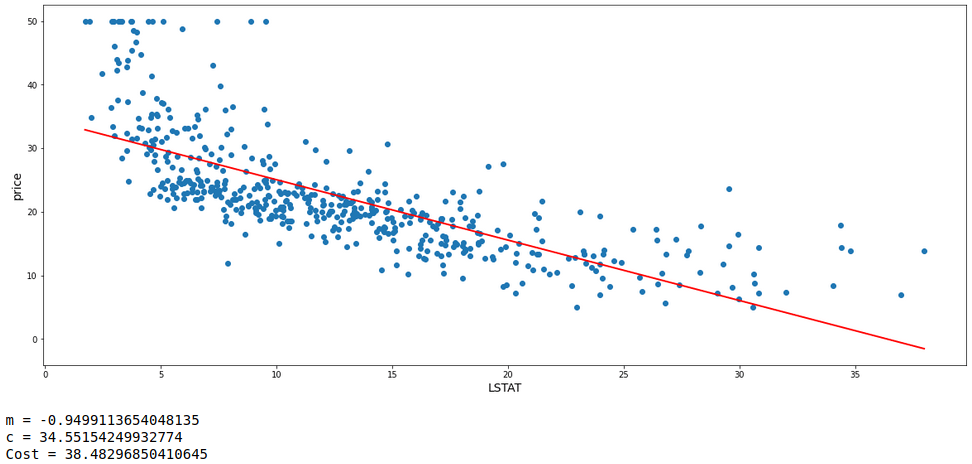
Now with all concepts and formulae set up, lets perform 20,000 iterations with m = 0, c = 0, learning rate = 0.001, and fit a straight line within the data points with the obtained value of m and c. Let’s have a look at the model fit and also the values of m, c, and cost of the model.

def gradient_descent(X, y, m_start=0, c_start=0, lrn=0.001, n_iter=10000):
     
    # A dataframe is initiated
    gradient_df = pd.DataFrame(columns=['m','c','cost'])
 
    # Value of m and c
    m = m_start
    c = c_start
     
    predicts = m*X + c
    cost = mean_squared_error(y,predicts)
     
    # 1st entry is made for the cost a initial values of m and c
    gradient_df.loc[0] = [m,c,cost]
     
    n = 1
    while n<=n_iter:
        m_grad = gradients(X,y,m,c)[0]
        c_grad = gradients(X,y,m,c)[1]
 
        m = m - m_grad*lrn
        c = c - c_grad*lrn
 
        predicts = m*X + c
        cost = mean_squared_error(y,predicts)
 
        gradient_df.loc[n] = [m,c,cost]
 
        n += 1
 
    return gradient_df


descent = gradient_descent(df.LSTAT,df.price,n_iter=20000)
 
req = descent[descent.cost==descent.cost.min()]
m = req.iloc[0,0]
c = req.iloc[0,1]
best_fit(df.LSTAT,df.price,m,c)
 
print('m =',m)
print('c =',c)
print('Cost =',mean_squared_error(df.price, (m*df.LSTAT)+c))

This is the best model achieved so far with the least error. In order to back this gradient descent performed, let’s automate this by building a Linear Regression model with ‘scikit-learn’ library in python to get the values of m, c, and cost.

# Linear Regression model is fit
model = LinearRegression().fit(X,y)

m = model.coef_[0]
c = model.intercept_

# 'best_fit' is the custom function to fit the straight line with the provided coefficient and intercept
best_fit(df.LSTAT,df.price,m,c)

print('m =',m,'\nc =',c,'\nCost =',mean_squared_error(df.price, (m*df.LSTAT)+c))

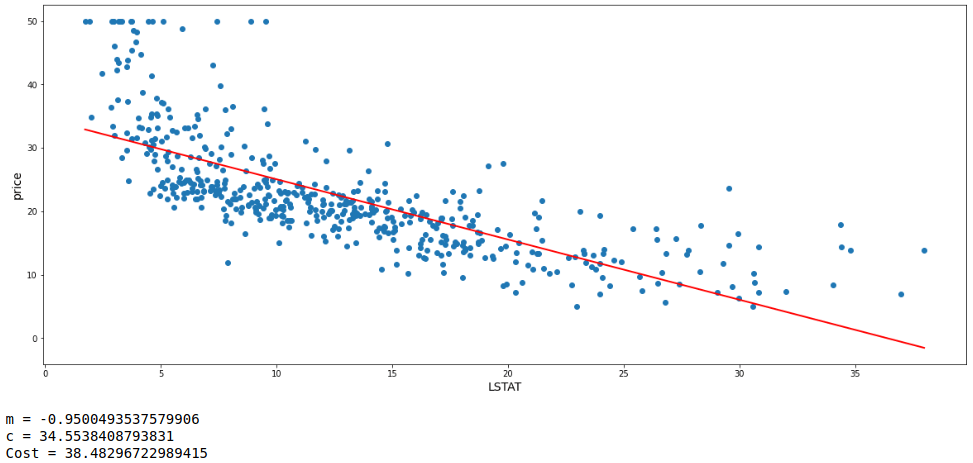
That was almost a wonderful match of the values between the model built manually and the one created by the automated process.

I hope I could successfully explain the basic concept of gradient descent algorithm. Now, it is time to move a step ahead. Let’s try to explore taking 2 features at a time. Therefore, I am choosing ‘LSTAT’ and ‘RM’ as the features along with ‘price’ as the target variable.

# 'multi' is the dataframe extract of the main data frame with one additional features
multi = df[['RM','LSTAT','price']]
multi.head()

This process follows the same principle and formulae as well. Only the difference is that sine there are multiple features involved, hence there will be multiple slopes for each feature. Thus for this, arrays are formed of slopes and used as matrices to perform calculations like multiplying each slope with its respective feature values during working out gradients, making predictions and many more.

# 'multi_gradient_descent' performs gradient descent over multiple features at a time
def multi_gradient_descent(X, y, m_start=0, c=0, lrn=0.001, n_iters=25000):
    
    store = pd.DataFrame(columns= [f'm_of_{i}' for i in X.columns] + ['c', 'cost'])
    
    ms = [{f'm{i}' : m_start} for i in X.columns]
    dic = {k:v for x in ms for k,v in x.items()}
    dic

    nos = 0
    while nos<=n_iters:

        res = []
        for i in range(len(X.columns)):
            mul = list(dic.values())[i] * X.iloc[:,i]
            res.append(mul)
        pred = sum(res) + c        


        m_gradients = []
        for i in range(len(X.columns)):
            grad = (sum((y - pred)*X.iloc[:,i]) * (-2/len(X)))
            m_gradients.append(grad)

        m_gradients = np.array(m_gradients)        
        
        
        c_gradient = sum(y - pred) * (-2/len(X))


        k=0
        for i in dic.keys():
            dic[i] = dic[i] - lrn*m_gradients[k]
            k += 1
        
        
        c = c - lrn*c_gradient
        
        
        res = []
        for i in range(len(X.columns)):
            mul = list(dic.values())[i] * X.iloc[:,i]
            res.append(mul)
        predicted = sum(res) + c
        
        
        cost = mean_squared_error(y,predicted)
        
        store.loc[nos] = list(dic.values())+[c,cost]
        
        
        nos += 1

    return store
X = multi.drop('price', axis=1)
y = multi.price

obt = multi_gradient_descent(X,y,n_iters=20000)

rr = obt[obt.cost == obt.cost.min()]

m = np.array(rr.iloc[0,:-2])
c = rr.c.values[0]
preds = np.matmul(X, m) + c

X = multi.drop('price', axis=1)
y = multi.price


# Creating dataset
a = np.array(X.LSTAT)
b = np.array(X.RM)
c = np.array(y)
p = preds
 
# Creating figure
plt.figure(figsize = (13,13))
ax = plt.axes(projection ="3d")
 
# Creating plot
ax.scatter3D(a, b, c, color = "green", s=8, label='actual')
ax.scatter3D(a, b, p, color = "red", s=8, label='predicted')

ax. set_xlabel('LSTAT', fontsize=13)
ax. set_ylabel('RM', fontsize=13)
ax. set_zlabel('price', fontsize=13)
plt.legend(fontsize=12)

ax.view_init(30,250)
 
# show plot
plt.show()


print('Cost =',mean_squared_error(y,preds))

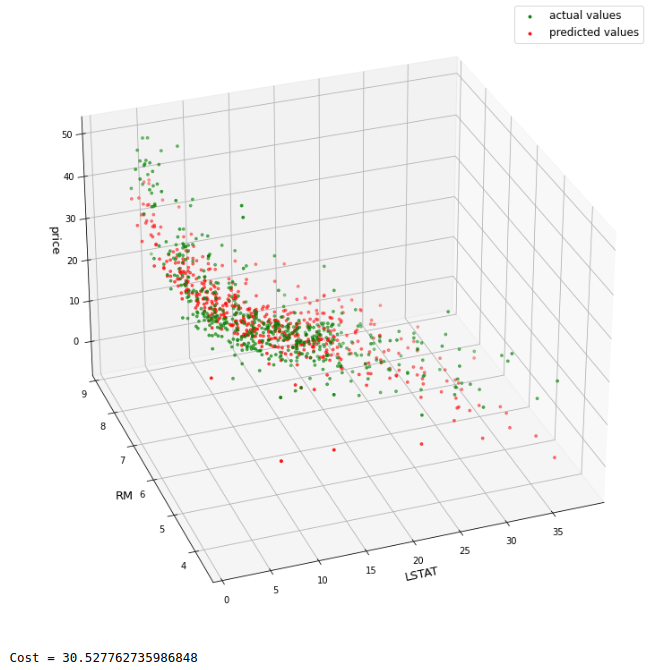
It seems there is a fairly nice match of patterns of actual and predicted values. Moreover, the cost value is lesser than the cost obtained in the model built with one feature only. For comparison purpose, let’s build a ‘scikit-learn’ Linear Regression model as well.

lr_multi = LinearRegression().fit(X,y)
lr_preds = lr_multi.predict(X)

# Creating dataset
a = np.array(X.LSTAT)
b = np.array(X.RM)
c = np.array(y)
p = lr_preds
 
# Creating figure
plt.figure(figsize = (13,13))
ax = plt.axes(projection ="3d")
 
# Creating plot
ax.scatter3D(a, b, c, color = "green", s=8, label='actual values')
ax.scatter3D(a, b, p, color = "magenta", s=8, label='predicted values')

ax. set_xlabel('LSTAT', fontsize=13)
ax. set_ylabel('RM', fontsize=13)
ax. set_zlabel('price', fontsize=13)
plt.legend(fontsize=12)

ax.view_init(30,250)
 
# show plot
plt.show()


print('Cost =',mean_squared_error(y,lr_preds))

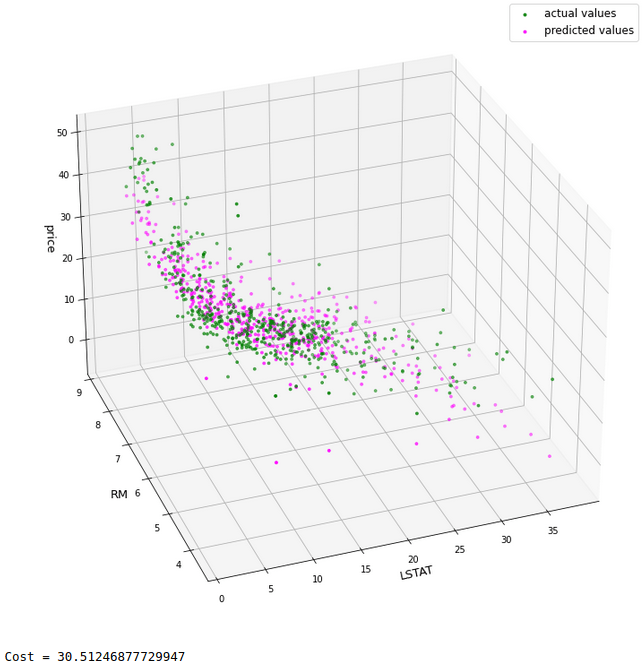
As we can see, there is a very good match between both the models with a comparable cost value.

Till now, we not only saw gradient descent but also saw that how does a Linear Regression works, that is, how it works behind the screen and attempts to do prediction.

—END—